SCIM
Overview {#overview}
System for Cross-domain Identity Management (SCIM) is an open standard protocol that provides a standardized interface for exchanging user information.
Using SCIM streamlines the process of provisioning members and groups from an Identity Provider (IdP) and reduces manual work.
It is implemented based on the following SCIM 2.0 RFC documentation.
Supported features {#supported-features}
The IdP (Identity Provider) or HR system can use the following features through SCIM integration.
Automatic account creation (provisioning)
When new member information is added to the IdP or HR system, an account is automatically created in LINE WORKS through provisioning.
Automatic account deactivation (deprovisioning)
When a member leaves and is deleted from the IdP or HR system, they are automatically deactivated in LINE WORKS as well.
Deactivated members can no longer log in to LINE WORKS. For more information, see User - Status.
Information sync
When member information (name, email, phone number, etc.) is changed in the IdP or HR system, it is automatically synced to LINE WORKS.
Group management
You can centrally manage group membership for teams created for communication purposes such as projects or task forces.
When members of a group are added to or deleted from the IdP or HR system, the changes are automatically reflected in LINE WORKS.
This allows control over access to resources such as message rooms and message room features (Note, Calendar, Folder, and Task).
For more information, see Group.
Prerequisites {#prerequisites}
SCIM provisioning is only available for paid plans; it is not available for free plans.
How to make API calls {#api-call}
API endpoint {#api-endpoint}
The endpoint to make a SCIM API call is as follows:
https://www.worksapis.com/scim/v2For example, to get a list of members, it would be as follows:
GET https://www.worksapis.com/scim/v2/UsersAuthorization {#authorization}
Making an API call requires an access token.
You need to get an access token as specified in Get a Long-Lived Token for SCIM and specify it with "Bearer" in the Authorization header.
Authorization: Bearer {Access Token}Resources {#resources}
User {#user}
API operations {#user-api}
You can manage members.
| HTTP request | Description |
|---|---|
| POST /scim/v2/Users | Add a member |
| GET /scim/v2/Users | Get members |
| GET /scim/v2/Users/{userId} | Get a member |
| PUT /scim/v2/Users/{userId} | Update a member |
| PATCH /scim/v2/Users/{userId} | Update part of a member |
| DELETE /scim/v2/Users/{userId} | Deactivate a member. Instead of changing the member status to retired or completely deleting a member, this API operation sets the member's active property to false to change the status to suspended. To reactivate a deactivated member, set the active property to true using the Update a member or Update part of a member SCIM API operation. To delete a member, you need to call the Delete a member or Force delete a member LINE WORKS API operation or use the Admin Console. |
Status {#user-status}
The status lifecycle of members provisioned via SCIM is as follows:
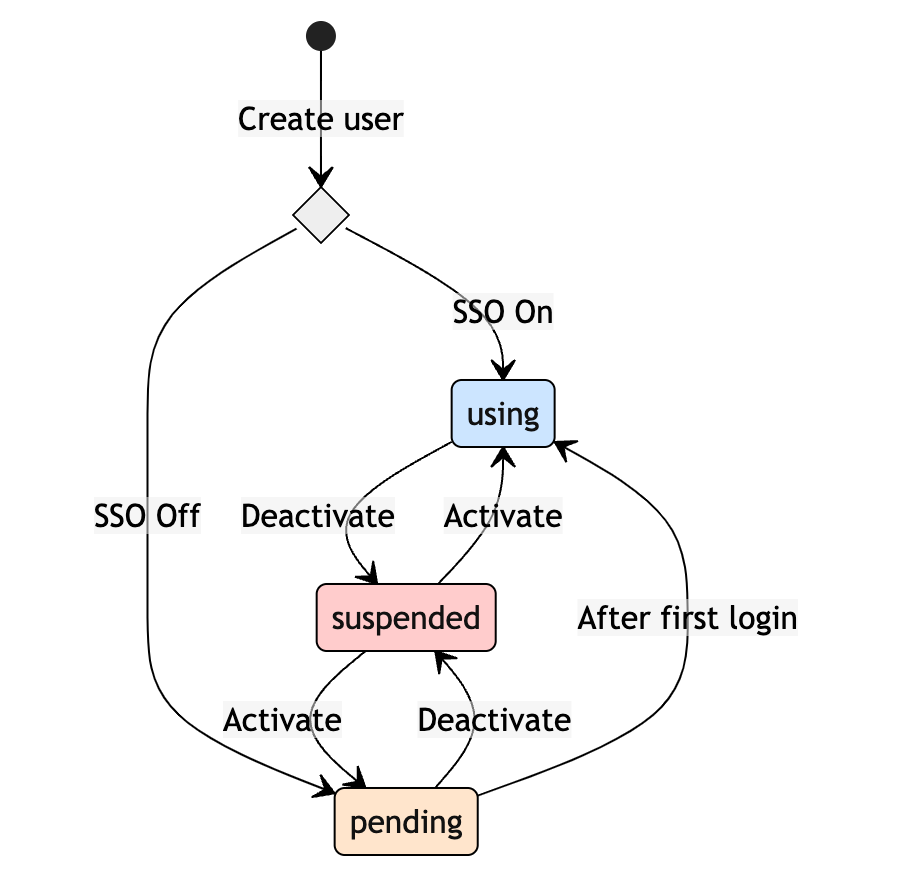
The activation status of a member is managed by the active property (boolean).
Within LINE WORKS, the active property indicates "login availability."
The active property values for each member status are as follows.
For more information on member statuses, see Directory API - Member (users).
| Member status | LINE WORKS APIs | The active property value of a SCIM user | Note |
|---|---|---|---|
| Not logged-in | isPending=true | true | |
| Awaiting | isAwaiting=true | false | The member status cannot be set using the SCIM API. The member cannot be activated until the activation date specified by the administrator. Therefore, it cannot be changed to active: true. |
| Active | true | ||
| Suspended | isSuspended=true | false | The member status when active: false is set using Update a member or Update part of a member or when Deactivate a member is called. |
| Delete | isDeleted=true | false | The member status cannot be set using the SCIM API. |
Group {#group}
With the SCIM Group API, you can manage only internal groups; you can only get dynamic groups, and cannot create, update, delete, and get external groups.
API operations {#group-api}
You can manage groups for communication purposes such as projects or in-house gatherings.
| HTTP request | Description |
|---|---|
| POST /scim/v2/Groups | Add a group |
| GET /scim/v2/Groups | Get groups |
| GET /scim/v2/Groups/{groupId} | Get a group |
| PUT /scim/v2/Groups/{groupId} | Update a group |
| PATCH /scim/v2/Groups/{groupId} | Update part of a group |
| DELETE /scim/v2/Groups/{groupId} | Delete a group |
Administrators and members {#group-administrator-and-member}
- You cannot add or delete group administrators using the SCIM Group API.
- Even if you are not a group administrator, you can update or delete groups using the SCIM Group API.
- Group members can only specify members or groups.
In LINE WORKS, group members can also specify teams. - Even if you change group members using the SCIM Group API, group administrators and team type group members will not be changed.
Message room features {#group-team-feature}
- When a group is added, the message room and mailing list features are deactivated by default.
To use the features, you need to update the group within the LINE WORKS service or activate them using the LINE WORKS API. - Properties that cannot be set using the SCIM Group API (message room features, mailing list, visibility, etc.) will remain the same even if the Update a group or Update part of a group SCIM API operation is called.
Rate limits {#rate-limit}
The SCIM API has a rate limit of 240 requests/min per API.
Constraints {#limitations}
- Filter
- Only eq is supported.
- Users can only be filtered by the userName property, and groups can only be filtered by the displayName property.
- No other features are provided.
- Patch operation
- For more information, see PATCH operation.
- The following features are not provided.
- Bulk Operations
- Sync Password
- Sort
- eTag
- Self Resource
- A corporate group has the following constraints:
- An access token can be used only for the domain where it is issued. In a corporate group, therefore, you must use the access token issued for each domain.
- You cannot set concurrent positions in other domains using the SCIM User API; you need to use the Admin Console or the LINE WORKS APIs to do so.
- To use with SSO (SAML 2.0), go to SSO > WORKS as SP(SAML) in the Developer Console and select "LINE WORKS Account (ex. id@domain)" for
User Key. - Resources provisioned through SCIM can also be updated or deleted within the LINE WORKS services.
Note that updating properties provisioned through SCIM using the LINE WORKS services or APIs may cause data inconsistency with the Identity Provider (IdP). - Properties that cannot be set with the SCIM User API, such as team, job level, position, and visibility, can be updated using the Admin Console or the LINE WORKS API. Even if those values are updated or partially updated, they will remain the same.
PATCH operation {#patch-operation}
The PATCH operation works based on RFC 7644 - 3.5.2. Modifying operates according to the PATCH.
The filter operation is provided in a limited manner.
- Only the eq and and operators are provided.
- The and operation allows a maximum of 2 operands only.
That is,A and Bis allowed, butA and B and Cis not allowed.
Allowed operation types {#patch-operation-use-case}
In the Operations property of the Request Body, the allowed formats for each type of property to update are as follows.
Single value property type (string, integer, boolean)
ADD, REPLACE
- Use Case 1
{ "op": "[ ADD | REPLACE ]", "path": "{key}", "value": "{value}"}- Use Case 2
{ "op": "[ ADD | REPLACE ]", "value": { "{key}": "{value}" }}REMOVE
{ "op": "REMOVE", "path": "{key}"}Object property type
ADD, REPLACE
- Use Case 1
{ "op": "[ ADD | REPLACE ]", "path": "{mainKey}.{subKey}", "value": "{value}"}- Use Case 2
{ "op": "[ ADD | REPLACE ]", "path": "{mainKey}", "value": { "{subKey1}": "{value1}", "{subKey2}": "{value2}", ... }}- Use Case 3
{ "op": "[ ADD | REPLACE ]", "value": { "{mainKey}": { "{subKey1}": "{value1}", "{subKey2}": "{value2}" , ... } }}REMOVE
- Use Case 1
{ "op": "REMOVE", "path": "{mainKey}"}- Use Case 2
{ "op": "REMOVE", "path": "{mainKey}.{subKey}"}Array property type
ADD, REPLACE
- Use Case 1
{ "op": "[ ADD | REPLACE ]", "path": "{key}", "value": [ object1, object2, ... ]}- Use Case 2
{ "op": "[ ADD | REPLACE ]", "value": { "{key}": [ object1, object2, ... ] }}- Use Case 3
{ "op": "[ ADD | REPLACE ]", "path": "{key}[filter]", "value": object}- Use Case 4
{ "op": "[ ADD | REPLACE ]", "path": "{key}[filter].{subKey}", "value": "{value}"}- Use Case 5 : Only ADD is supported.
{ "op": "ADD", "path": "{key}", "value": object}REMOVE
- Use Case 1
{ "op": "REMOVE", "path": "{key}"}- Use Case 2
{ "op": "REMOVE", "path": "{key}[filter]"}- Use Case 3
{ "op": "REMOVE", "path": "{key}", "value": [ { "value": "{value}" }, ... ]}- Use Case 4
{ "op": "REMOVE", "path": "{key}[filter]", "value": [ { "value": "{value}" }, ... ]}Audit {#audit}
You can check the SCIM API call history by filtering the service type to SCIM on the Audit > Contacts page of the Admin Console.