Directory API
The Directory API helps you get and update resources of members and teams under Member in the LINE WORKS Admin, such as Member, Team, and Group. You can access the following resources using the Directory API:
- Member (
users) - Group (
groups) - Team (
orgunits) - Job level (
levels) - Position (
positions) - User type (
user-types) - Member custom property (
user-custom-properties) - Status (
profile-statuses)
To use the Directory API, you need an access token that you can get by authenticating with a user account or a service account.
The API scopes are as follows:
directory: All resources are accessible.user: Only member resources are accessible.group: Only group resources are accessible.orgunit: Only team resources are accessible.
Information used to specify a resource {#designate-resource}
To access resources including members, groups, teams, job levels, positions, user types, and custom fields, you need to specify which resource you want to access using a resource ID, an external key, or a login ID.
Resource ID {#resource-id}
A resource ID is a unique value assigned by the system when each resource is added. Considering its characteristics listed below, you can use a resource ID to specify and identify a resource with the API.
- Each resource is always assigned a resource ID.
- A resource ID is a permanent value for a resource.
- A resource ID is unique among resources.
- A resource ID is always included when you get a resource using the API.
External key {#external-key}
An external key is an arbitrary value that the API user or administrator can assign to each resource in LINE WORKS.
If you add your company's system ID as an external key for a LINE WORKS resource, you can use it as is in LINE WORKS.
You can add an external key using the API or under Organization Sync in the Developer Console.
For how to bulk add external keys using the API, see Update and get external keys.
The format of an external key to specify a resource is as follows:
externalKey:ExternalKey valueRestrictions on external keys {#external-key-restrictions}
For each resource type, the characters and values for an external key must be unique within a tenant or domain.
Here are restrictions on external keys.
| Resource | Property | Restrictions | Range |
|---|---|---|---|
Member (users) | userExternalKey | % \ # / ? are not allowed. | Tenant |
Team (orgunits) | orgUnitExternalKey | % \ # / ? are not allowed. | Tenant |
Group (groups) | groupExternalKey | % \ # / ? are not allowed. | Tenant |
User type (user-types) | userTypeExternalKey | % # / ? are not allowed. | Tenant |
Job position (position) | positionExternalKey | % # / ? are not allowed. | Domain |
Job level (levels) | levelExternalKey | % # / ? are not allowed. | Domain |
Login ID {#login-id}
You can specify a member's external key as a login ID.
Member (users) {#user}
This resource corresponds to members of LINE WORKS.
Caution
- The properties you can get or set using the API depend on the member properties set in the LINE WORKS Admin.
Note
- A member can have a status of the following: awaiting, pending, using, suspended, and deleted, each of which is described in the following table. You can check the status of a member using the Get a member or Get members API operation.
|Status | Parameter | Description | |---|---|---| | awaiting | isAwaiting | The status of an account before activationDate.
It becomes pending or using depending on whether SSO is enabled. | | pending | isPending | Not logged-in.
A member added by the administrator has not yet logged in. | using | n/a | In use. | | suspended | isSuspended | Suspended.
Login is not allowed, but the member data is retained. | | deleted | isDeleted | Deleted.
The data remains for 7 days from the time of deletion and is deleted after that. |
Add and update a member {#add-update-user}
You can add and update a member. You can set a password only when adding a member.
| HTTP request | Description |
|---|---|
| POST /users | Add a member |
| PUT /users/{userId} | Update a member |
| PATCH /users/{userId} | Update part of a member |
Get members {#get-user-list}
You can get a list of members in a domain, which you can sort and filter if needed.
| HTTP request | Description |
|---|---|
| GET /users | Get members |
| GET /users/search | Search members |
Get a member {#get-user-information}
Depending on how you use this API operation, you can get the response containing only specified fields.
Here are three ways of getting a member. The API operation returns different member information based on the scope specified when you get an access token.
| HTTP request | Description |
|---|---|
| GET /users/{userId} | Get a member. Scope: user.read / userIt returns all member information. |
| GET /users/{userId} | Get a member's profile. Scope: user.profile.readIt returns only the member's profile information. The response does not include personal information such as privateEmail or birthday. |
| GET /users/{userId} | Get a member's email address. Scope: user.email.readIt returns only the member ID ( userID) and login ID (email). |
You can get a list of groups or teams the member belongs to using the following API.
| HTTP Request | Description |
|---|---|
| GET /users/{userId}/groups | Get groups of a member |
| GET /users/{userId}/orgunits | Get teams of a member |
Delete a member {#delete-user}
There are two types of deletion: delete (delayed delete) and force delete. A deleted member can be undeleted within 7 days after deletion. A member who has been deleted for 7 days or who is force-deleted cannot be recovered.
| HTTP request | Description |
|---|---|
| DELETE /users/{userId} | Delete a member |
| DELETE /users/{userId}/forcedelete | Force delete a member |
| POST /users/{userId}/undelete | Undelete a member |
Manage member photos {#manage-user-photo}
You can manage member photos using the following API operations.
| HTTP request | Description |
|---|---|
| POST /users/{userId}/photo | Upload a member photo |
| GET /users/{userId}/photo | Get a member photo |
| DELETE /users/{userId}/photo | Delete a member photo |
For more information about how to upload or download files, see Upload or Download Files.
Manage member statuses {#manage-user-status}
You can manage member statuses using the following API operations. For how to manage domain statuses, see Status (profile-statuses).
| HTTP request | Description |
|---|---|
| POST /users/{userId}/user-profile-statuses | Add member statuses |
| GET /users/{userId}/user-profile-statuses | Get member statuses |
| GET /users/{userId}/user-profile-statuses/{userProfileStatusId} | Get a member status |
| PUT /users/{userId}/user-profile-statuses/{userProfileStatusId} | Update a member status |
| PATCH /users/{userId}/user-profile-statuses/{userProfileStatusId} | Update part of a member status |
| DELETE /users/{userId}/user-profile-statuses/{userProfileStatusId} | Delete a member status |
A member can have "current status" and "scheduled status".
{ "userProfileStatuses": [ { "profileStatusID": "AWAY", "statusMessage": "I'm out. ", "startTime": "2023-05-11T09:00:00+09:00", "endTime": "2023-05-11T12:00:00+09:00", ... } ]}Manage permission to chat with external users {#manage-link-to-externaluser}
You can manage permission to chat with external LINE WORKS users or LINE users.
Use the following API operations to manage permission to chat with external LINE WORKS users .
| HTTP request | Description |
|---|---|
| POST /users/link-to-works | Grant a domain permission to chat with external LINE WORKS users |
| POST /users/{userId}/link-to-works | Grant a member permission to chat with external LINE WORKS users |
| POST /users/{userId}/unlink-to-works | Delete a member's permission to chat with external LINE WORKS users |
Use the following API operations to manage permission to chat with external LINE users.
| HTTP request | Description |
|---|---|
| POST /users/link-to-line | Grant a domain permission to chat with external LINE users |
| POST /users/{userId}/link-to-line | Grant a member permission to chat with external LINE users |
| POST /users/ {userId} /unlink-to-line | Delete a member's permission to chat with external LINE users |
Use the following API operations to manage a URL for adding an external contact.
| HTTP request | Description |
|---|---|
| GET /users/{userId}/link-url | Get a URL for adding an external contact |
| POST /users/{userId}/link-url/reset | Reset the URL for adding an external contact |
Caution
- The
userscope is required. With thedirectoryscope, you cannot manage permission to chat with external users.
Suspend a user or set a leave of absence {#user -suspend-leaveofpending}
You can set a "leave of absence" or "suspend" a member. Then, the leave of absence information is displayed on the member's profile and organization chart. The member is also indicated as leaveOfAbsence when you get the member information using the API. A suspended member cannot log in to LINE WORKS; the member is indicated as isSuspended when you get the member information using the API.
| HTTP request | Description |
|---|---|
| POST /users/{userId}/suspend | Suspend a member |
| POST /users/{userId}/unsuspend | Unsuspend a member |
| POST /users/{userId}/set-leave-of-absence | Set a leave of absence |
| POST /users/{userId}/clear-leave-of-absence | Clear a leave of absence |
Manage members {#manage-user}
You can invite members or force them to log out using the following API operations.
| HTTP request | Description |
|---|---|
| POST /users/{userId}/send-invitation-email | Resend an invitation |
| POST /users/send-invitation-email | Bulk resend invitations |
| POST /users/{userId}/force-logout | Force log out a member |
Group {#group}
You can create groups for communication such as projects or in-house gatherings. Use the following API operations to manage groups.
| HTTP request | Description |
|---|---|
| POST /groups | Add a group |
| GET /groups | Get groups |
| GET /groups/search | Search groups |
| GET /groups/{groupId} | Get a group |
| PUT /groups/{groupId} | Update a group |
| PATCH /groups/{groupId} | Update part of a group |
| DELETE /groups/{groupId} | Delete a group |
| GET /groups/{groupId}/administrators | Get group masters |
| POST /groups/{groupId}/administrators | Add a group master |
| DELETE /groups/{groupId}/administrators/{userId} | Remove a group master |
| GET /groups/{groupId}/members | Get group members |
| POST /groups/{groupId}/members | Add a group member |
| DELETE /groups/{groupId}/members/{id} | Delete a group member |
A group can use features such as Message, Note, Calendar, Task, and Folder. Groups are managed by domain. You need to specify at least one group master to manage the group, and can add members, teams or other groups to the group.
{ "groupName": "Verification", "administrators": [ { "userId": "user-40d6-450f-1c78-1234567890ab", "userExternalKey": null }, { "userId": "user-08ee-41fb-1a61-1234567890ab", "userExternalKey": null } ], "members": [ { "id": "user-40d6-450f-1c78-1234567890ab", "type": "USER", "externalKey": null }, { "id": "orgunit-5c41-4baf-239e-1234567890ab", "type": "ORGUNIT", "externalKey": null }, { "id": "group-6bb3-40ea-37a7-1234567890ab", "type": "GROUP", "externalKey": null } ],...}Dynamic group {#dynamic-group}
Using dynamic groups, you can create conditions (queries) to automatically manage group members according to specific rules. Members who match the specified conditions are automatically added to or removed from a group.
Here is how to create a dynamic group query:
Available attributes {#dynamic-group-query-property}
You can use the following attributes to create a query.
| User attribute | Description | Example |
|---|---|---|
| user.userTypeId | Specify a rule for user type IDs | user.userTypeId == 'usertypei-70c3-46a8-22dd-03ef7c571975' |
| user.levelId | Specify a rule for user job level IDs | user.levelId == 'levelid8e-70c3-46a8-22dd-03ef7c571975' |
| user.location | Specify a rule for user workplaces | user.location == 'Office' |
| user.task | Specify a rule for user tasks | user.task == 'Planing' |
| user.organizations.exists(organization, organization.domainId={domainId}) | Specify a rule for user companies | user.organizations.exists(organization, organization.domainId == 123) |
| user.organizations.exists(organization, organization.domainId={domainId} && organization.primary=true) | Specify a rule for user companies and whether the company is primary | user.organizations.exists(organization, organization.domainId == 123 && organization.primary==true) |
| user.organizations.orgUnits.exists(orgUnit, orgUnit.orgUnitId == '{orgUnitId}') | Specify a rule for user teams | user.organizations.orgUnits.exists(orgUnit, orgUnit.orgUnitId == 'orgunit8e-70c3-46a8-22dd-03ef7c571975') |
| user.organizations.orgUnits.exists(orgUnit, orgUnit.isManager == true) | Specify a rule indicating whether a user is the team leader | user.organizations.orgUnits.exists(orgUnit, orgUnit.orgUnitId == 'orgunit8e-70c3-46a8-22dd-03ef7c571975' && orgUnit.isManager == true) |
| user.organizations.orgUnits.exists(orgUnit, orgUnit.positionId == '{positionId}') | Specify a rule for user positions | user.organizations.orgUnits.exists(orgUnit, orgUnit.positionId == 'positione-70c3-46a8-22dd-03ef7c571975') |
| user.organizations.orgUnits.exists(orgUnit, orgUnit.orgUnitId == '{orgUnitId}' && orgUnit.positionId == '{positionId}') | Specify a rule for user teams and positions | user.organizations.orgUnits.exists(orgUnit, orgUnit.orgUnitId == 'orgunit8e-70c3-46a8-22dd-03ef7c571975' && orgUnit.positionId == 'positione-70c3-46a8-22dd-03ef7c571975') |
Functions {#dynamic-group-query-function}
| Function | Description | Example |
|---|---|---|
| isMemberOfOrgUnit | A team ID is required. Add members of the team for the specified team ID and its subteams to a group. | user.isMemberOfOrgUnit('orgunit8e-70c3-46a8-22dd-03ef7c571975') |
| isMemberOfGroup | A group ID is required. Add members of the group for the specified group ID to a group. | user.isMemberOfGroup('groupit8e-70c3-46a8-22dd-03ef7c571975') |
Negative support
Add an exclamation mark (!) before a conditional statement enclosed with parentheses (()).
| User attribute | Negative support | Example |
|---|---|---|
| user.userTypeId | Y | !(user.userTypeId == 'usertypei-70c3-46a8-22dd-03ef7c571975') |
| user.levelId | Y | !(user.levelId == 'levelid8e-70c3-46a8-22dd-03ef7c571975') |
| user.location | Y | !(user.location == 'Office') |
| user.task | Y | !(user.task == 'Planing') |
| user.organizations.exists(organization, organization.domainId={domainId}) | N | N/A |
| user.organizations.exists(organization, organization.domainId={domainId} && organization.primary=true) | N | N/A |
| user.organizations.orgUnits.exists(orgUnit, orgUnit.orgUnitId == '{orgUnitId}') | Y | !(user.organizations.orgUnits.exists(orgUnit, orgUnit.orgUnitId == 'orgunit8e-70c3-46a8-22dd-03ef7c571975')) |
| user.organizations.orgUnits.exists(orgUnit, orgUnit.isManager == true) | Y | !(user.organizations.orgUnits.exists(orgUnit, orgUnit.orgUnitId == 'orgunit8e-70c3-46a8-22dd-03ef7c571975' && orgUnit.isManager == true) |
| user.organizations.orgUnits.exists(orgUnit, orgUnit.positionId == '{positionId}') | Y | !(user.organizations.orgUnits.exists(orgUnit, orgUnit.positionId == 'positione-70c3-46a8-22dd-03ef7c571975')) |
| user.organizations.orgUnits.exists(orgUnit, orgUnit.orgUnitId == '{orgUnitId}' && orgUnit.positionId == '{positionId}') | Y | !(user.organizations.orgUnits.exists(orgUnit, orgUnit.orgUnitId == 'orgunit8e-70c3-46a8-22dd-03ef7c571975' && orgUnit.positionId == 'positione-70c3-46a8-22dd-03ef7c571975')) |
| Function | Negative support | Example |
|---|---|---|
| isMemberOfOrgUnit | Y | !(user.isMemberOfOrgUnit('orgunit8e-70c3-46a8-22dd-03ef7c571975')) |
| isMemberOfGroup | Y | !(user.isMemberOfGroup('groupit8e-70c3-46a8-22dd-03ef7c571975')) |
Conditions {#dynamic-group-query-condition}
A condition is the smallest unit of a query. The format of a condition is as follows:
{attribute} {operator between attribute and value} {value} Example) user.userTypeId == 'usertypei-70c3-46a8-22dd-03ef7c571975'
Operators {#dynamic-group-query-operator}
Here are the logical operators that can be used between conditions.
- &&: AND operator. It requires that both conditions are true.
- ||: OR operator. It requires that at least one of the conditions is true.
You can use the following operator between an attribute and a value.
- ==: Equality operator. It requires that the attribute and the value are equal.
Condition priority {#dynamic-group-query-priority}
The priority of conditions is as follows:
- Conditions in parentheses
- Conditions combined with &&
- Conditions combined with ||
- If the priorities are equal, the conditions are evaluated from left to right.
Example)
A || B && C: B && C is evaluated first.(A || B) && C: (A || B) is evaluated first.A || B || C: A || B is evaluated first.
Restrictions {#dynamic-group-query-restrictions}
The following restrictions apply:
- Up to 10 attributes are available for a query.
- A negative statement can only be applied to one condition.
- A negative statement cannot be included in a function.
- The depth of the parentheses to indicate the evaluation order must be 2 or less.
Team (orgunits) {#orgunit}
You can add teams (orgunits) to LINE WORKS according to your company's team information. For projects or in-house gatherings, use groups rather than teams. You can manage teams using the following API operations:
| HTTP request | Description |
|---|---|
| POST /orgunits | Add a team |
| GET /orgunits | Get teams |
| GET /orgunits/search | Search teams |
| GET /orgunits/{orgUnitId} | Get a team |
| PUT /orgunits/{orgUnitId} | Update a team |
| PATCH /orgunits/{orgUnitId} | Update part of a team |
| DELETE /orgunits/{orgUnitId} | Delete a team |
| POST /orgunits/{orgUnitId}/move | Move a team |
| GET /orgunits/{orgUnitId}/members | Get team members |
A team can use features such as Message, Note, Calendar, Task, and Folder. Teams are managed by domain. You can find and set a member's team in teams (orgUnits).
{ "email": "user@example.com", "organizations": [ { ... "orgUnits": [ { "orgUnitId": "orgunit-0faa-4f37-22bb-1234567890ab", "orgUnitName": "Sales team", ... } ] } ], ...Access restrictions in the organization chart {#orgunit-access-restrict}
You can set access restrictions in the organization chart.
You can manage member access restrictions using the following API operations.
| HTTP request | Description |
|---|---|
| POST /orgunits/{orgUnitId}/orgunit-access-restrict | Set access restrictions for a member |
| GET /orgunits/{orgUnitId}/orgunit-access-restrict | Get access restrictions for a member |
| PUT /orgunits/{orgUnitId}/orgunit-access-restrict | Update access restrictions for a member |
| DELETE /orgunits/{orgUnitId}/orgunit-access-restrict | Delete access restrictions for a member |
You can manage user type access restrictions using the the following API operations.
| HTTP request | Description |
|---|---|
| POST /directory/user-types/{userTypeId}/orgunit-access-restrict | Set access restrictions for a user type |
| GET /directory/user-types/{userTypeId}/orgunit-access-restrict | Get access restrictions for a user type |
| PUT /directory/user-types/{userTypeId}/orgunit-access-restrict | Update access restrictions for a user type |
| DELETE /directory/user-types/{userTypeId}/orgunit-access-restrict | Delete access restrictions for a user type |
You can manage team access restrictions using the following API operations.
| HTTP request | Description |
|---|---|
| POST /orgunits/{orgUnitId}/orgunit-access-restrict | Set access restrictions for a team |
| GET /orgunits/{orgUnitId}/orgunit-access-restrict | Get access restrictions for a team |
| PUT /orgunits/{orgUnitId}/orgunit-access-restrict | Update access restrictions for a team |
| DELETE /orgunits/{orgUnitId}/orgunit-access-restrict | Delete access restrictions for a team |
Access restrictions apply in the following order: "member," "user type," and "team."
For example, if a specific user's access restrictions are set for a member, user type, and team, those for a member apply; depending on the restriction type, the user can view their own information, their team, or their team and specified teams only.
Job level {#level}
Levels are job grades, such as assistant manager or manager, given to members. You can manage levels using the following API operations.
| HTTP request | Description |
|---|---|
| POST /directory/levels/enable | Enable job levels |
| POST /directory/levels/disable | Disable job levels |
| POST /directory/levels | Add a job level |
| GET /directory/levels | Get job levels |
| GET /directory/levels/{levelId} | Get a job level |
| PUT /directory/levels/{levelId} | Update a job level |
| PATCH /directory/levels/{levelId} | Update part of a job level |
| DELETE /directory/levels/{levelId} | Delete a job level |
Levels are managed by domain. You can specify and get a member's job level using an automatically assigned levelID.
{ "email": "user@example.com", "organizations": [ { "domainId": 12345678, "organizationName": "Sample store", "levelId": "level-1999-4212-7979-1234567890ab", "levelName": "Executive"...Position {#position}
Positions refer to a work responsibility assigned to each member. You can manage positions using the following API operations.
| HTTP request | Description |
|---|---|
| POST /directory/positions/enable | Enable positions |
| POST /directory/positions/disable | Disable positions |
| POST /directory/positions | Add a position |
| GET /directory/positions | Get positions |
| GET /directory/positions/{positionId} | Get a position |
| PUT /directory/positions/{positionId} | Update a position |
| PATCH /directory/positions/{positionId} | Update part of a position |
| DELETE /directory/positions/{positionId} | Delete a position |
Positions are managed by domain. Since a member can belong to multiple teams (orgUnits), the member can be assigned a different position for each team.
{ "email": "user@example.com", "organizations": [ { ... "orgUnits": [ { "orgUnitId": "orgunit-0faa-4f37-22bb-1234567890ab", "orgUnitName": "Sales team", "primary": false, "positionId": null, ... }, { "orgUnitId": "orgunitc-1d15-4cdf-246b-1234567890ab", "orgUnitName": "Sales 1", "primary": true, "positionId": "position-821e-41af-8142-1234567890ab", "positionName": "Manager", ... } ] } ], ...}User type {#user-type}
User types (user-types) are an attribute used to grant a member different permissions, such as permission to use services, access restrictions in the organization chart, and sharing restrictions in a drive or board. You can manage user types using the following API operations.
| HTTP request | Description |
|---|---|
| POST /directory/user-types/enable | Enable user types |
| POST /directory/user-types/disable | Disable user types |
| POST /directory/user-types | Add a user type |
| GET /directory/user-types | Get user types |
| GET /directory/user-types/{userTypeId} | Get a user type |
| PUT /directory/user-types/{userTypeId} | Update a user type |
| PATCH /directory/user-types/{userTypeId} | Update part of a user type |
| DELETE /directory/user-types/{userTypeId} | Delete a user type |
User types are managed by domain. You can specify and get a member's user type using an automatically assigned userTypeId.
{ "email": "user@example.com", "userTypeId": "employmenttype-75b9-48dd-917a-1234567890ab", "usertypeName": "Contract employee"Member custom property {#user-custom-properties}
Member custom properties (user-custom-properties) can be additionally defined for a member. You can manage member custom properties using the following API operations.
| HTTP request | Description |
|---|---|
| POST /directory/users/custom-properties | Add member custom properties |
| GET /directory/users/custom-properties | Get member custom properties |
| GET /directory/users/custom-properties/{customPropertyId} | Get a member custom property |
| PATCH /directory/users/custom-properties/{customPropertyId} | Update a member custom property |
| DELETE /directory/users/custom-properties/{customPropertyId} | Delete a member custom property |
You can add up to 50 member custom properties per domain. If multivalued for a custom property is true, you can add up to 10 values for the property. The types of a custom property include text, link, number, and date, where you can specify a list of options for the text type. You can specify whether it is mandatory, and the read and write permissions for each custom property. You can also specify whether each property can have a single value or multiple values.
You can set or get member custom properties using the customProperties field of the Members API.
{ "email": "user@example.com", "customProperties": { "field_string": "string", "field_string_multiValued": [ "string" ], "field_string_option": "optionName1", "field_string_multiValued_option": [ "optionName1" ], "field_date": "YYYY-MM-DD", "field_date_multiValued": [ "YYYY-MM-DD" ], "field_integer": 123, "field_integer_multiValued": [ 123 ], "field_link": { "text": "string", "link": "string" }, "field_link_multiValued": [ { "text": "string", "link": "string" } ] }, ...}Caution
- When a new property is created using member custom properties (user-custom-properties):
- It is accessible only if multiValued is true and propertyType is STRING or LINK in customFields of Members. Note that even if propertyType is STRING, the property is not accessible if there are options values.
- If customFields and customProperties for Members are specified at the same time, customProperties takes priority over customFields.
- We recommend that you use member custom properties (user-custom-properties) rather than custom fields. Using custom fields prevents you from accessing new features only available with member custom properties (user-custom-properties).
- Custom fields are automatically migrated to member custom properties.
- customFieldExternalKey → fieldName (fieldName is automatically created if there is no customFieldExternalKey value.)
- customFieldId → customPropertyId
- customFieldName → displayName
- Parameters that do not exist in custom fields are created with default values in member custom properties.
- multiValued: true
- mandatory: false
- readAccessType: ALL
- writeAccessType: ADMIN
Status (profile-statuses) {#profile-status}
A member's status is indicated by an icon in the organization chart, the profile, and the member list in a message room. You can manage statuses using the following API operations.
| HTTP request | Description |
|---|---|
| POST /directory/profile-statuses/enable | Enable statuses |
| POST /directory/profile-statuses/disable | Disable statuses |
| POST /directory/profile-statuses | Add status values |
| GET /directory/profile-statuses | Get status values |
| GET /directory/profile-statuses/{profileStatusId} | Get a status |
| PUT /directory/profile-statuses/{profileStatusId} | Update a status |
| PATCH /directory/profile-statuses/{profileStatusId} | Update part of a status |
| DELETE /directory/profile-statuses/{profileStatusId} | Delete a status |
Statuses are managed by domain. The default values, BUSY, AWAY, LEAVE_OFFICE, and ABSENCE cannot be changed or deleted. You can add up to 20 user status values, including the default values.
For more information, see Manage member statuses.
Update and get external keys {#externalkey-bulk-manage}
You can update or get external keys using the following API operations.
| HTTP request | Description |
|---|---|
| POST /users/external-keys | Update member external keys |
| GET /users/external-keys | Get member external keys |
| POST /groups/external-keys | Update group external keys |
| GET /groups/external-keys | Get group external keys |
| POST /orgunits/external-keys | Update team external keys |
| GET /orgunits/external-keys | Get team external keys |
| POST /directory/levels/external-keys | Update level external keys |
| GET /directory/levels/external-keys | Get level external keys |
| POST /directory/positions/external-keys | Update position external keys |
| GET /directory/positions/external-keys | Get position external keys |
| POST /directory/user-types/external-keys | Update user type external keys |
| GET /directory/user-types/external-keys | Get user type external keys |
Organization sync {#org-sync}
Organization sync is the process of synchronizing the customer's team information with LINE WORKS's. The Directory API helps you perform organization sync.
Organization sync requires the following:
- Client app that covers the directory scope
- Service account
- Organization Sync settings in the Developer Console (optional)
Organization sync menus {#org-sync-menu}
The following settings are available under Organization Sync in the Developer Console.
Enable organization sync {#org-sync-setting}
Turn On the items to sync, such as Organization/Member, Level/Position, Group, User type, Language/Time Zone, and Sync Status. If you want to allow members to concurrently hold more than one position in different domains, you should also turn On the items to sync for the secondary domain. Depending on the Organization Sync settings, LINE WORKS features are limited as follows:
Restrictions in the LINE WORKS Admin {#admin-operation-dependent}
- If Setting for use of Organization Syncing is On, members who have the status of "Approval Pending" are deleted, and Invite member in the LINE WORKS Admin is automatically disabled.
- If Organization/Member is On, members and teams are read only in the LINE WORKS Admin. If the field for allowing the team features is selected, each of them can be enabled or disabled in the LINE WORKS Admin.
- If Level/Position is On, Member > Position/Level is not displayed in the LINE WORKS Admin.
- If Group is On, basic group information cannot be edited in the LINE WORKS Admin. If the field for allowing the group features is selected, each of them can be enabled or disabled in the LINE WORKS Admin.
- If User Type is On, Member > User Type is not displayed in the LINE WORKS Admin.
Restrictions on members {#user-operation-related}
- If Organization/Member is On, you can choose whether to allow members to edit their profile images.
- If Language is On, a member cannot set the language and time zone field.
- If Sync Status is On, a member cannot set the status field.
Access organization sync items {#org-sync-access}
You can identify and access each item of teams, members, groups, user types, levels, positions, and statuses in the following ways:
- Use a resource ID (recommended): To access these resources, use a resource ID that is automatically assigned when each item is created.
- Use external key mapping: You can additionally specify an ID that is mapped with each item of teams, members, groups, user types, levels, positions, and statuses to connect with the groupware information in use. An external key cannot contain the special characters, % and , and must be unique within a tenant or domain as shown below:
- For teams, members, groups, and user types: It must be unique within a tenant.
- For levels and positions: It must be unique within a domain.
The Directory API can use a resource ID or external key mapping to access resources.
External key mapping {#external-key-mapping}
You can download and edit the entire information for each item, and then upload it for mapping.
- Select Organization Sync in the Developer Console.
- Click DOWNLOAD on each External Key Mapping section.
- Enter external keys in the downloaded CSV file and save it.
- Click UPLOAD to upload the changed file.
- Preview the uploaded file and correct any duplicate external keys.
- Click Save.
Custom URL {#custom-url}
This menu opens the specified custom URL in the organization chart popup, email contacts and personal information popup. For popups, include a member name in the #SEARCHTEXT# parameter.
Note
- You can set a custom URL regardless of Organization Sync or API settings.
Order of sync batch processing {#org-sync-by-api}
After all preparations are completed, you can now use the Directory API.
- It is recommended to process the organization sync batch in the following order: Level/Position/User Type → Team → Member → Group. For example, a team must be set before members are added.
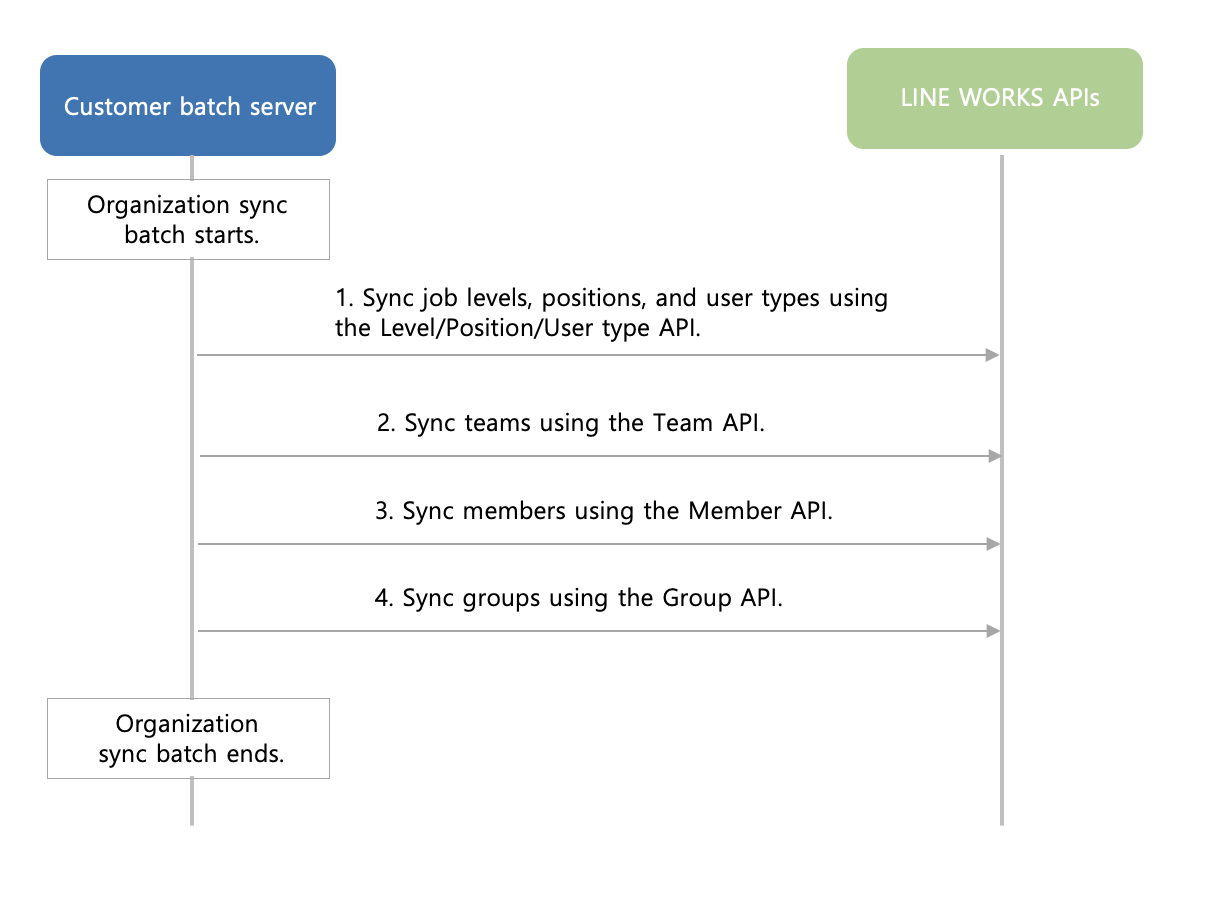
[Figure Organization sync batch]
- Please perform organization syncing as a daily batch.
- When a failure occurs during the batch process, you can handle it according to your company's rollback policy. We recommend you to carry on with the process if part of a stage, which means syncing part of an organization, fails, and to stop it if the entire stage fails.
- Make sure not to make 5 or more concurrent API calls, and the Directory API must be called in a single thread.
- When you update member or group information, integrate only the updated information to avoid any unnecessary work. Example) When only some teams need to be renamed
- You must implement logic to handle a failed API call.
- It is necessary to build a log management or monitoring system to detect an API call failure.