파일 업로드/다운로드
Bot 콘텐츠, 드라이브의 파일, 구성원 프로필 사진, 연락처 사진 등의 파일을 서버에 업로드하거나 서버에서 다운로드하는 방법을 설명한다.
파일 업로드 {#file-upload}
파일을 업로드하는 절차는 다음과 같다.
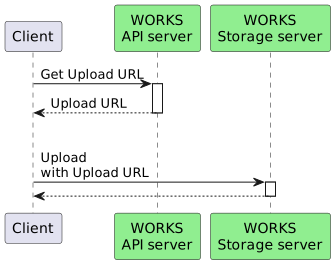
1. 파일 업로드 URL 요청 {#get-upload-url}
각 서비스에 파일 업로드를 위한 URL을 요청한다.
Request URL {#get-upload-url-api}
파일 업로드 URL을 얻기 위한 요청 URL은 서비스마다 다르다. 자세한 내용은 다음의 문서를 참고한다.
Request Body {#get-upload-url-request-body}
다음과 같은 파라미터를 JSON 형식으로 작성하여 POST 메서드를 호출한다.
| Property | Type | Required | Description |
|---|---|---|---|
| fileName | String | Required | 업로드할 파일명 |
| fileSize | Long | Required | 업로드할 파일 크기(byte) |
File Resource {#get-upload-url-request-resource}
| Property | Type | Required | Description |
|---|---|---|---|
| fileName | String | Required | 업로드할 파일명 |
| fileSize | Long | Required | 업로드할 파일 크기(byte) |
| modifiedTime | String | Optional | 파일 수정 일시 |
| overwrite | boolean | Optional | 파일 덮어쓰기 여부 |
Request Body Example
{ "fileName": "fileName", "fileSize": 1000000}Response {#get-upload-url-response}
요청한 파일 업로드 URL을 응답으로 받는다. 자세한 내용은 각 서비스의 업로드 URL 요청 문서의 응답을 참고한다.
| Property | Type | Description |
|---|---|---|
| uploadUrl | String | 파일을 업로드할 URL |
Response Example {#get-upload-url-response-example}
{ "uploadUrl": "https://apis-storage.worksmobile.com/k/emsg/r/kr1/1628695775389602000.1628782175.1.1000001.0.0.0/file.jpg"}2. 파일 업로드 {#file-content-upload}
파일 업로드를 위해 발급받은 URL을 이용하여 서버에 파일을 업로드한다. 이어올리기 요청이면 Content-Range 헤더로 offset값을 전달해야 한다.
Request URL {#file-content-upload-request-url}
응답으로 받은 업로드 URL
HTTP Method {#file-content-upload-request-method}
POST (Content-Type: multipart/form-data; boundary="$boundary”)
Request Example {#file-content-upload-request-example}
POST /k/emsg/r/kr1/1628695775389602000.1628782175.1.1000001.0.0.0/file.jpg HTTP/1.1Host: apis-storage.worksmobile.comAuthorization: Bearer ...Content-Length: 1000Content-Type: multipart/form-data; boundary=----WebKitFormBoundary7MA4YWxkTrZu0gW----WebKitFormBoundary7MA4YWxkTrZu0gWContent-Disposition: form-data; name="Filedata"; filename="xxx.jpg"Content-Type: image/jpeg(data)----WebKitFormBoundary7MA4YWxkTrZu0gW--Request Example(이어올리기) {#file-content-resume-upload-request-example}
POST /k/emsg/r/kr1/1628695775389602000.1628782175.1.1000001.0.0.0/file.jpg HTTP/1.1Host: apis-storage.worksmobile.comAuthorization: Bearer ...Content-Length: 1000Content-Type: multipart/form-data; boundary=----WebKitFormBoundary7MA4YWxkTrZu0gWContent-Range: 100-999/1000----WebKitFormBoundary7MA4YWxkTrZu0gWContent-Disposition: form-data; name="Filedata"; filename="xxx.jpg"Content-Type: image/jpeg(data)----WebKitFormBoundary7MA4YWxkTrZu0gW--Request Example(CURL) {#file-content-upload-request-example-curl}
curl -XPOST 'https://apis-storage.worksmobile.com/k/emsg/r/kr1/1628695775389602000.1628782175.1.1000001.0.0.0/file.jpg' \-H 'Authorization: Bearer ...' \-H 'Content-Type: multipart/form-data' \-F 'resourceName=file.jpg' \-F 'FileData=@file.jpgHTTP/1.1 201 CreatedContent-Type: application/json;charset=UTF-8Content-Length: 120{ "fileId": "kr1.1628695315008671000.1628781715.0.1000001.0.0.0", "fileName": "file.jpg", "fileSize": "11"}Response {#file-content-upload-response-body}
파일 업로드에 대한 응답. 리소스에 따라 응답이 달라질 수 있다.
| Property | Type | Description |
|---|---|---|
| fileId | String | 파일 ID |
| fileName | String | 파일 이름 |
| fileSize | Integer | 파일 크기 |
File Resource {#file-content-upload-response-body-drive}
| Property | Type | Description |
|---|---|---|
| fileId | String | 파일 ID |
| fileName | String | 파일 이름 |
| fileSize | Integer | 파일 크기 |
| parentFileId | String | 부모 폴더의 파일 ID |
| accessedTime | String | 접근 일시 |
| createdTime | String | 생성 일시 |
| filePath | String | 파일 경로 |
| fileType | String | 파일 유형 |
| hasPermission | Boolean | 권한 존재 여부 |
| permissionRootFileId | String | 권한 루트 폴더 ID |
| resourceLocation | Integer | 리소스 위치 코드 |
| statuses | Array(String) | 파일 상태 |
| modifiedTime | String | 수정 일시 |
파일 다운로드 {#file-download}
파일을 다운로드하는 절차는 다음과 같다.
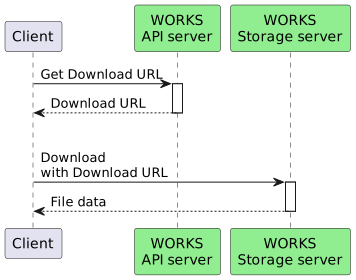
1. 파일 다운로드 URL 조회 {#get-download-url}
Request URL {#get-download-url-api}
각 서비스의 다운로드 API. 자세한 내용은 다음의 문서를 참고한다.
HTTP Method {#get-download-url-request-method}
GET
Path Parameter {#get-download-url-request-parameter}
| Property | Type | Required | Description |
|---|---|---|---|
| fileId | String | Required | 파일 ID |
Response {#get-download-url-response}
HTTP 302와 함께 location Header에 다운로드 가능한 URL을 응답 코드로 반환한다.
Response Example {#get-download-url-example}
HTTP/1.1 302 Found location: https://apis-storage.worksmobile.com/kr1.1628695315008671000.1628781715.0.1000001.0.0.02. 파일 다운로드 URL 호출 {#download-file-content}
location Header에 지정된 URL로 다운로드를 시작한다.
Request Example(CURL) {#file-content-download-request-example-curl}
curl -XGET 'https://apis-storage.worksmobile.com/kr1.1628695315008671000.1628781715.0.1000001.0.0.0' \-H 'Authorization: Bearer ...' HTTP/1.1 200 OKContent-Type: image/jpegContent-Length: 11(FileData)