WOFF Guide
This page describes what LINE WORKS front-end framework (WOFF) is and how you can develop a WOFF app.
What is WOFF {#about-woff}
WOFF is a JavaScript based webview framework provided by LINE WORKS. It is a platform that runs LINE WORKS's built-in web applications, which are called WOFF apps. With WOFF apps, you can create a feature using user information such as a user ID or name or send messages in a message room, instead of a user. WOFF is provided as an SDK available to anyone. Note that you need permission to add an app in the Developer Console.
Advantages of WOFF {#why-use-woff}
Advantages of WOFF are as follows:
- WOFF apps are web apps which you do not need to implement for each OS (Android and iOS).
- WOFF apps are available in any environments where LINE WORKS is installed, without installation.
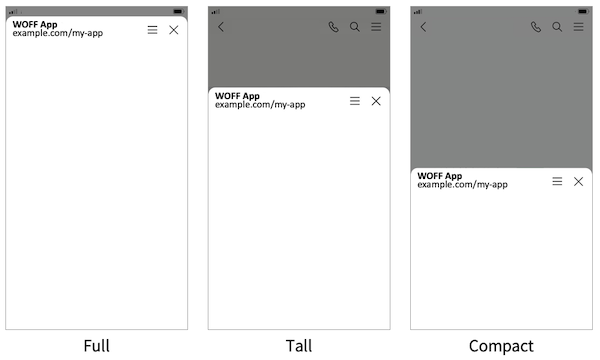
- You can select the size of a WOFF app from Full, Tall, and Compact, depending on how you want to use the app.
- You can use WOFF apps directly in a message room.
- You can stay logged in to LINE WORKS in both an in-app browser and an external browser.
Recommended environments {#operating-environment}
The recommended environments for WOFF are as follows:
| Device | Recommended |
|---|---|
| iOS mobile app | The latest version. WKWebView is used. |
| Android mobile app | The latest version. Android WebView is used. |
| Desktop app | The latest version. It runs in a desktop browser. |
| Desktop browser | It runs in a new tab. |
For more information, see System requirements.
Glossary {#glossary}
The following table shows the terms you should understand before you add and build a WOFF app.
| Field | Description |
|---|---|
| WOFF ID | WOFF app identifier, which is issued when a WOFF app is added. Add it to the WOFF SDK's initialization function, woff.init(). |
| WOFF URL | URL to run a WOFF app, which includes a WOFF ID. It is issued by the Developer Console and can be used as a deep link. |
| Endpoint URL | URL where a WOFF app lives. A user accessing the WOFF URL is redirected to the Endpoint URL. |
| WOFF browser | The browser in which a WOFF app runs. When a user opens the WOFF URL in LINE WORKS, the WOFF browser is launched. |
| Access Token | Token issued by the WOFF SDK when woff.init() is run. It is revoked 12 hours after issuance or when the WOFF app is closed. |
Add a WOFF app {#create-woff-app}
To use a WOFF app, you need to add it to the Developer Console.
Information required to add a WOFF app {#settings}
A WOFF app is displayed under API app > WOFF app in the Developer Console. Select Register to add a WOFF app.
| Field | Description |
|---|---|
| WOFF name | WOFF app name. The WOFF app name specified in this field is displayed to users.
|
| Endpoint URL | Web app URL of the WOFF app (e.g.: https://example.com/my-app/?key=value).When users run the WOFF app, they are redirected to this URL.
|
| Size | WOFF app's screen size. You can select one of the following:
 |
You need to specify the API scopes, depending on the features you wish to use. For more information, see WOFF SDK.
Information created when a WOFF app is added {#information-generated}
When a WOFF app is added, a WOFF ID and URL for the WOFF endpoint URL are created in LINE WORKS.
- WOFF ID (e.g.:
1654426689BR7LN87b) - WOFF URL (e.g.:
https://woff.worksmobile.com/woff/1654426689BR7LN87b)
How a WOFF app runs {#open-woff-app}
When a WOFF app is run in LINE WORKS, the WOFF URL with the path and parameter added is redirected to the predefined endpoint URL.
WOFF URL: https://woff.worksmobile.com/woff/1654426689BR7LN87bEndpoint URL: https://example.com/my-app/?key=valueWOFF URL with additional information included: https://woff.worksmobile.com/woff/1654426689BR7LN87b/path_A/?key1=value1#URL-fragmentURL to redirect to when you access the WOFF URL with additional information included: https://example.com/my-app/path_A/?key=value&key1=value1Note
- When you specify query parameters, "/" must come before "?".
- URI fragment
#is not available.- If a WOFF app has been added, it opens on the mobile app regardless of the Open in External Browser settings.
- To open another page in the WOFF app, run woff.openWindow().
Develop a WOFF app {#develop-woff-app}
Set the title of a WOFF app and import the WOFF SDK to develop a WOFF app.
Set the title of a WOFF app {#title-of-woff-app}
Set the title of a WOFF app using the HTML
<!DOCTYPE html><html lang="en"> <head> <title>WOFF app</title>Import the WOFF SDK {#import-woff-sdk}
Add the WOFF SDK URL in the HTML source code.
<script charset="utf-8" src="https://static.worksmobile.net/static/wm/woff/edge/3.7.4/sdk.js"></script>The WOFF SDK is written in UTF-8, and its latest version is 3.7.4. For more information, see WOFF SDK.
Notes {#notes-for-developers}
Please be aware of the following when developing a WOFF app.
Endpoint URL information {#note-about-endpoint-url}
Since the WOFF endpoint URL includes important information such as an access_token, make sure that it is not exposed to external sources, such as a logging tool.
Restrictions on changing the WOFF endpoint URL {#note-about-initializing}
The woff.init() method is run based on the information such as woff.state or access_token, which is added to the URL when a WOFF app is run. To successfully complete the initialization, therefore, it is recommended that you do not change the URL before the front-end processing is completed.
Restrictions on bulk requests {#note-about-bulk-requests}
DO NOT send requests in bulk to the LINE WORKS platform using a WOFF app or bulk access the app.