Partner API
Caution
- The Partner API is available only to partners who manage customers.
- It is not available for regular tenants.
- The Partner API (to be deprecated) will be phased out in the future.
- For information on the API operations to be deprecated and where to migrate them, see the description for each operation.
The Partner API helps you manage tenant information for your customers in the Partner Console.
To use the Partner API, you need an access token that you can get by authenticating with a user account or a service account.
The API scopes are partner and partner.read.
Add customers {#register-customer}
You can add the following two types of customers.
- New customers starting to use the LINE WORKS platform
- Those companies that have recently contracted with the partner to use the LINE WORKS platform.
- →Add a new customer
- Customers already using the LINE WORKS platform
- Those companies already using the LINE WORKS services.
- → Attract Online Direct customers
■ Add a new customer {#register-new-customer}
Adds a new customer that has recently contracted with the partner to use the LINE WORKS platform.
Verify a domain or group name {#verify-domain}
To verify whether you can use a domain or group name, use the following API operation.
| HTTP request | Description |
|---|---|
| POST /partners/customers/verify-domain | Verify a domain name |
Add a customer {#register-customer}
Adds a customer.
You can add new customer information using the following API operation.
| HTTP request | Description |
|---|---|
| POST /partners/customers | Add a customer |
For domains other that .by-works.com, you need to verify DNS registration information and then domain ownership (activate the customer) after DNS settings. Use the following API operations.
| HTTP request | Description |
|---|---|
| GET /partners/customers/{domainId}/upgrade-domain | Get a domain to upgrade |
| POST /partners/customers/{domainId}/activate | Activate a customer |
Caution
- If the customer uses the Mail service on the LINE WORKS Advanced plan, verify the MX record settings in the customer's LINE WORKS Admin.
■ Transfer Online Direct customers {#potential-customer}
Transfers Online Direct customers already using the LINE WORKS platform to the partner.
You can transfer Online Direct customers using the following API operations.
| HTTP request | Description |
|---|---|
| GET /partners/potential-customers/{domain} | Get an Online Direct customer |
| POST /partners/potential-customers/{domain}/transfer | Transfer an Online Direct customer to the partner |
Manage customers {#manage-customers}
Customer information {#manage-customer}
You can manage customer information using the following API operations.
| HTTP request | Description |
|---|---|
| GET /partners/customers | Get customers |
| GET /partners/customers/{domainId} | Get a customer |
| PUT /partners/customers/{domainId} | Update a customer |
| PATCH /partners/customers/{domainId} | Update part of a customer |
Customer usage status {#usage-status}
You can get customer usage information, set the maximum number of users, and schedule a cancellation, using the following API operations.
| HTTP Request | Description |
|---|---|
| GET /partners/customers/{domainId}/usage-status | Get usage status |
| PATCH /partners/customers/{domainId}/usage-status | Update part of usage status |
You can manage a scheduled task to set the maximum number of users for the customer, using the following API operations.
| HTTP Request | Description |
|---|---|
| POST /partners/customers/{domainId}/usage-status/renewal | Add a scheduled task to change usage status |
| PATCH /partners/customers/{domainId}/usage-status/renewal | Update a scheduled task to change usage status |
| DELETE /partners/customers/{domainId}/usage-status/renewal | Delete a scheduled task to change usage status |
Caution
- You can check the scheduled task to set the maximum number of users for the customer, using Get usage status.
Change a group name to a domain name {#change-to-domain}
Changes a group name to a domain name.
For customers using the LINE WORKS Advanced plan (including the Trial version), their group name must be changed to a domain name.
Verify whether a domain name is available, using the following API operation.
| HTTP request | Description |
|---|---|
| POST /partners/customers/verify-domain | Verify a domain name |
For domains other than .by-works.com, you need to add a domain for upgrade in advance.
You can add a domain using the following API operations.
| HTTP Request | Description |
|---|---|
| POST /partners/customers/{domainId}/upgrade-domain | Add a domain for upgrade |
| GET /partners/customers/{domainId}/upgrade-domain | Get a domain to upgrade |
| DELETE /partners/customers/{domainId}/upgrade-domain | Delete a domain to upgrade |
After adding a domain, set up DNS.
To change a group name to a domain name, use the following API operation.
| HTTP Request | Description |
|---|---|
| POST /partners/customers/ {domainId} /change-domain | Change a group name to a domain name |
Caution
- If the customer uses the Mail service on the LINE WORKS Advanced plan, verify the MX record settings in the customer's LINE WORKS Admin.
Check subscriptions {#manage-subscriptions}
You can check customer subscriptions using the following API operations.
| HTTP Request | Description |
|---|---|
| GET /partners/customers/{domainId}/subscriptions | Get subscriptions |
| GET /partners/customers/{domainId}/subscriptions/{subscriptionId} | Get a subscription |
Update subscriptions {#subscriptions-update}
You can update subscriptions.
How to apply {#subscriptions-update-method}
There are 4 types to apply updated subscriptions.
Apply immediately {#realtime-subscription-update}
You can apply subscription updates immediately.What you can apply immediately is as follows:
- Start using the subscription
- Start a paid subscription
- Upgrade a subscription
- Add the number of licenses
- Cancel a subscription
You can find more details including available API operations in the following sections.
Schedule an application {#subscriptions-preorder}
You can schedule an application for a paid subscription by specifying the start date of use.
You need to apply for a Free or Trial subscription immediately.
| HTTP request | Description |
|---|---|
| POST /partners/customers/{domainId}/subscriptions/pre-orders | Add a scheduled task to apply for a subscription |
| GET /partners/customers/{domainId}/subscriptions/pre-orders | Get scheduled tasks to apply for a subscription |
| PATCH /partners/customers/{domainId}/subscriptions/pre-orders/{preOrderId} | Update a scheduled task to apply for a subscription |
| DELETE /partners/customers/{domainId}/subscriptions/pre-orders/{preOrderId} | Delete a scheduled task to apply for a subscription |
Schedule an update {#subscriptions-update-reservation}
You can schedule an update for the following by specifying the scheduled date.
- Start a paid subscription
- Add the number of licenses
- Cancel a subscription
Use the following API operations.
| HTTP Request | Description |
|---|---|
| POST /partners/customers/{domainId}/subscriptions/{subscriptionId}/reservation | Add a scheduled task for a subscription |
| GET /partners/customers/{domainId}/subscriptions/{subscriptionId}/reservation | Get a scheduled task for a subscription |
| PATCH /partners/customers/{domainId}/subscriptions/{subscriptionId}/reservation | Update a scheduled task for a subscription |
| DELETE /partners/customers/{domainId}/subscriptions/{subscriptionId}/reservation | Delete a scheduled task for a subscription |
※ For the API operations used to update a scheduled task for an option, see ■ Manage options.
Apply at renewal {#subscriptions-update-at-renewal}
You can apply changes at the next renewal of a subscription.
What you can apply at subscription renewal is as follows:
- Upgrade a subscription
- Change the number of licenses
- Change the contract type
Use the following API operations.
| HTTP request | Description |
|---|---|
| PATCH /partners/customers/{domainId}/subscriptions/{subscriptionId}/renewal | Update subscription renewal |
| GET /partners/customers/{domainId}/subscriptions/{subscriptionId}/renewal | Get subscription renewal |
■ Update a subscription {#change-subscription}
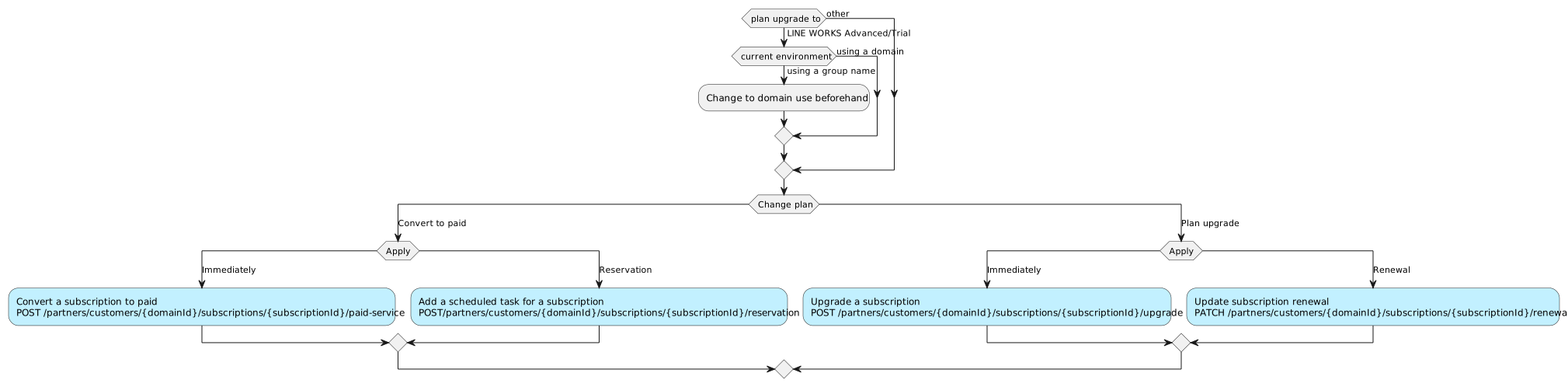
You can update a subscription in the following three ways:
- Add a subscription
- Starts using a subscription.
- For a paid subscription, you can not only apply it immediately but also schedule its application.
- Starts using a subscription.
- Start a paid subscription
- Converts a Free or Trial subscription to a paid one.
- You can apply it immediately or schedule its application.
- Upgrade a subscription
- Upgrades a subscription.
- You can apply it immediately or at subscription renewal.
Add a subscription {#add-subscriptions}
You can add a subscription using the following API operation. | HTTP Request | Description | |---|---| |POST /partners/customers/{domainId}/subscriptions| Add a subscription |
To schedule its application, see Schedule an application.
Start a paid subscription {#paid-service}
To convert a Free or Trial subscription to a paid one (apply immediately), use the following API operation.
| HTTP request | Description |
|---|---|
| POST /partners/customers/{domainId}/subscriptions/{subscriptionId}/paid-service | Convert a subscription to paid |
To schedule its application, see Schedule an update.
Upgrade a subscription {#plan-upgrade}
You can upgrade a subscription (apply immediately) using the following API operation.
| HTTP request | Description |
|---|---|
| POST /partners/customers/{domainId}/subscriptions/{subscriptionId}/upgrade | Upgrade a subscription |
To upgrade a subscription at renewal, see Apply at renewal.
■ Number of licenses {#change-license-count}
You can change the number of licenses for a subscription.
- Change the number of licenses
- You need to specify the number of licenses based on the subscription and contract type.
- Increasing the number of licenses can apply immediately or at subscription renewal.
- Reducing the number of licenses can apply only at subscription renewal.
Caution
To change the maximum number of users, you need to check the customer usage status.

Change the number of licenses {#add-license-count}
You can add licenses (apply immediately) using the following API operation.
| HTTP request | Description |
|---|---|
| POST /partners/customers/{domainId}/subscriptions/{subscriptionId}/add-license-count | Add licenses |
To schedule adding licenses, see Schedule an update.
To apply changing the number of licenses at renewal, see Apply at renewal.
■ Cancel a subscription {#cancel-subscriptions}
You can cancel a subscription (apply immediately) using the following API operation.
| HTTP request | Description |
|---|---|
| DELETE /partners/customers/{domainId}/subscriptions/{subscriptionId} | Cancel a subscription |
■ Manage options {#option-products}
You can manage options.
You can get, add, delete (apply immediately), upgrade options, or increase the quantity of options using the following API operations.
| HTTP request | Description |
|---|---|
| POST /partners/customers/{domainId}/option-products | Add an option |
| GET /partners/customers/{domainId}/option-products | Get options |
| DELETE /partners/customers/{domainId}/option-products/{optionProductId} | Cancel an option |
| POST /partners/customers/{domainId}/option-products/{optionProductId}/upgrade | Upgrade an option |
| PATCH /partners/customers/{domainId}/option-products/{optionProductId}/add-quantity | Add option quantity |
To schedule its application, use the following API operations.
| HTTP request | Description |
|---|---|
| POST /partners/customers/{domainId}/option-product-orders | Add scheduled tasks for options |
| GET /partners/customers/{domainId}/option-product-orders | Get scheduled tasks for options |
| GET /partners/customers/{domainId}/option-product-orders/{optionProductId} | Get the scheduled task for an option |
| PATCH /partners/customers/{domainId}/option-product-orders/{optionProductId} | Update a scheduled task for an option |
| DELETE /partners/customers/{domainId}/option-product-orders/{optionProductId} | Delete a scheduled task for an option |
To downgrade an option or reduce option quantity, use the following API operations.
| HTTP request | Description |
|---|---|
| GET /partners/customers/{domainId}/option-products/{optionProductId}/renewal | Get option renewal |
| PATCH /partners/customers/{domainId}/option-products/{optionProductId}/renewal | Update option renewal |
You can get the usage status of options using the following API operation.
| HTTP request | Description |
|---|---|
| GET /partners/customers/{domainId}/option-product-usages | Get option usage list |
■ Cancel a membership {#cancellation}
You can cancel a customer’s membership for LINE WORKS.
You can cancel a customer’s membership using the following API operation.
| HTTP request | Description |
|---|---|
| DELETE /partners/customers/{domainId} | Delete a customer |
NAVER WORKS platform cancellation reservations use partial updates of usage information.
Get invoices and customer usage {#history}
You can check customer usage and invoices.
Use the following API operations.
| HTTP request | Description |
|---|---|
| GET /partners/customers/{domainId}/usages | Get customer usage information |
| GET /partners/invoices | Get invoices |
| GET /partners/invoice-details | Get invoice details |