Receive Messages (Callback)
The bot server can receive the messages and events that a bot receives, through a callback.
An HTTPS POST request containing an event object is sent to the callback URL (bot server) specified in Bot in the Developer Console.
Caution
- For the callback URL, a self-signed certificate is not allowed for security reasons.
- To see the list of allowed certificate authorities, see CA List.
Flow of receiving a callback event {#callback-flow}
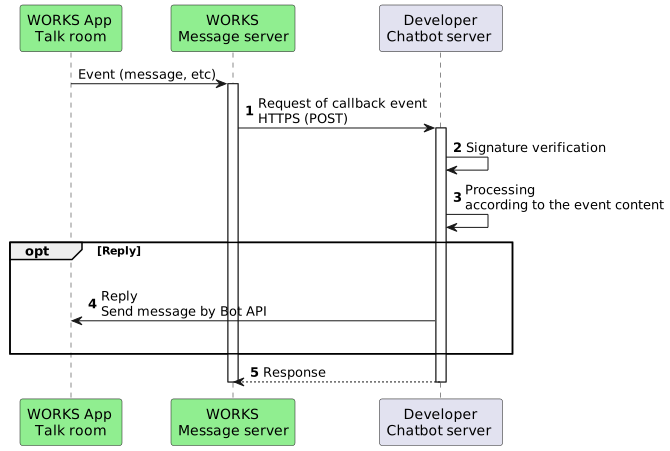
The processing flow of a callback event is as follows:
Note
- Events must be handled asynchronously to prevent the processing of consecutive requests from being delayed.
Callback request information {#request-from-message-server}
When a user joins a message room or sends a message, an HTTP POST request is sent to the specified callback URL (bot server).
Request header {#request-header}
| Field | Description |
|---|---|
| Content-Type | The content type of the request. Set this parameter to "application/json; charset=UTF-8". |
| X-WORKS-BotId | Bot ID |
| X-WORKS-Signature | Signature used to verify the signature |
Caution
- Field names in the request header are not case-insensitive; they may change without notice.
- For more information, 3.2 Header Fields in Hypertext Transfer Protocol (HTTP/1.1):Message Syntax and Routing.
Request body {#request-body}
The request body contains information formatted as JSON, such as the member's userId, the message room's channelId, or the message content.
Example) Message Event
{ "type": "message", "source": { "userId": "c72af563-0f21-4736-11e4-045237113344", "channelId": "12345a12-b12c-12d3-e123fghijkl", "domainId": 40029600 }, "issuedTime": "2022-01-04T05:16:05.716Z", "content": { "type": "text", "text": "hello" }}The content varies depending on the callback event type. For more information, see the description of each event type.
Verify a signature {#verify-signature}
Caution
- The HTTPS POST request received by the bot server must be handled after the signature is verified.
To confirm that the request was sent from LINE WORKS, you need to verify the signature included in the X-WORKS-Signature in the request header.
- Open the bot details page in Bot in the Developer Console and check the
Bot Secret. - Use the
Bot Secretas a private key to encode the received content body with HMAC-SHA256 algorithm. - Base64-encode the result encoded in the previous step.
- Compare it with the
X-WORKS-Signaturevalue to check if they match.
Caution
- Please ensure that the
Bot Secretis not exposed.
Here is an example of verifying a signature in Java:
String botSecret = ...;String httpRequestBody = ...; // Request body stringSecretKeySpec key = new SecretKeySpec(botSecret.getBytes(), "HmacSHA256");Mac mac = Mac.getInstance("HmacSHA256");mac.init(key);byte[] source = httpRequestBody.getBytes("UTF-8");String signature = Base64.encodeBase64String(mac.doFinal(source));// Compare X-WORKS-Signature request header and the signature// signature == headers_signatureHere is an example in Python:
import base64import hashlibimport hmacbot_secret = '...' # Bot Secret stringbody = '...' # Request body stringhash = hmac.new(bot_secret.encode('utf-8'), body.encode('utf-8'), hashlib.sha256).digest()signature = base64.b64encode(hash)# Compare X-WORKS-Signature request header and the signature#signature == headers_signatureCallback event types {#callback-event-type}
The types of callback events are as follows. A 1:1 message room and 1:N message room with a bot can receive different types of callback events.
| Type | Description | 1:1 message room | 1:N message room |
|---|---|---|---|
| Message Event | An event indicating that a user sent a message | ○ | ○ |
| Postback Event | An event indicating that a postback action was performed. | ○ | ○ |
| Join Event | An event indicating that a bot was invited to a 1:N message room. | ✕ | ○ |
| Leave Event | An event indicating that the bot left the 1:N message room. | ✕ | ○ |
| Joined Event | An event indicating that a user was invited to a team/group or 1:N message room where a bot is present. | ✕ | ○ |
| Left Event | An event indicating that a user left the team/group or 1:N message room where a bot is present. | ✕ | ○ |
For more information, see the description of each event type.
Get user information {#get-user-info}
The event object contains the userId of the member who sent the message. You can use this ID to get the member information, such as the member's name and email address.
For how to get user information, see Directory API . The user information you can access varies depending on the scopes specified when you get your access token.
| Accessible information | Scope |
|---|---|
| Email address | user.email.read |
| Profile information | user.profile.read |
| All user information | user.read |
For more information, see the API reference.
Reply (Send messages) {#reply}
A bot can reply (send a message) using the Bot API. For more information, see Bot API.
Response to LINE WORKS {#response}
The bot server that received a callback must return HTTP code 200 to LINE WORKS.