Authentication with a Service Account (JWT)
Using the LINE WORKS APIs 2.0 requires OAuth-based user approval. However, this makes it difficult to develop a client app that needs to access the data created by members, as in the case of organization sync or sending messages to check on members. This is why we use a virtual account called a "service account."
Note
- A service account enables the client app to access the member-created data without the member's approval.
- After creating a service account in the client app, the administrator can use it to get the permissions delegated from another administrator or member so as to access the data.
A service account has the following characteristics:
- First name: [SERVICE]
- Name: App name
- ID: It ends with "serviceaccount".
When using a service account to make an API call, you can use a JSON web token (JWT) to perform authentication at the same level as that with a user account. A service account is available only on the client app where it is issued, and must be included in each API request header as a bearer token.
- A service account is a virtual account and thus is not charged.
- A service account can be used only to make an API call; it cannot be used on the service pages such as member list, organization chart and search results.
- One client app can get only one service account.
- Permissions are delegated as soon as a service account is issued.
- Some API operations are not available with a service account.
- The me keyword cannot be used in userId of a Path parameter.
You can get a service account and a private key for JWT authentication from the Developer Console, after providing the basic information of your client app. The administrator will be notified when you get a service account.
If you encounter an error while approving a request using your service account, see JWT error codes.
API operations you cannot use with a service account {#prohibited-api}
The following API operations deal with sensitive user information and thus cannot be used with a service account.
| Scopes | API operations |
|---|---|
| group.note group.note.read | /groups/{groupId}/note* |
| mail mail.read | /users/{userId}/mail* Note that email migration and forwarding become available after the delegation of permission. |
| file file.read | /users/{userId}/drive* /sharedrives* /groups/{groupId}/folder* |
| group.folder group.folder.read | /groups/{groupId}/folder* |
| task task.read | /tasks* /users/{userId}/tasks* /users/{userId}/task-categories |
| form form.read | /forms* |
Authentication flow {#jwt-flow}
The authentication process using a service account is as follows:
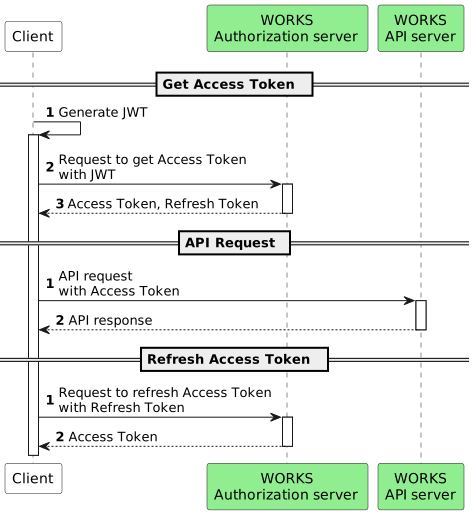
How to get a token with a service account
1. Prepare {#preparation}
In the Developer Console, add your client app and get the following information:
- Client ID
- Client Secret
- Service Account
- Private Key
To get a token, you need to follow the instructions below:
- Create a JWT (RFC-7519)
- Digitally sign the JWT (RFC-7515)
- Request a token from the LINE WORKS authorization server (RFC-7523)
2. Create a JWT {#generate-jwt}
A JWT must be in the following form:
{header BASE64 URL encoding}.{JSON Claim set BASE64 URL encoding}.{signature BASE64 URL encoding}eyJ0eXAiOiJKV1QiLCJhbGciOiJSUzI1NiJ9.eyJpc3MiOiI0NmM0ZjI4MWY4MTE0OGM5Yjg0NmM1OTI2MmFlNTg4OCIsImlhdCI6MTQ5MjUwNDY3MiwiZXhwIjoxNDkyNTA2NDcyfQ.aICZ8qvYFKSJT6VdrmEcs6siCHaCgFkqpVs5VALKhf98sZjguppp-bOy9MpNlNepfSF0IyrdG3JavHLUYBz1NEVVZJwEm39f7gODmnt-_kGfDo1YtOqnclP1gM8oiObF2AH2Eneh3XuyeVeZbKAZmp6I_ZOf8AGayVVui61CsDPbUIPZSKUnbW1-vlXboTlojxJhvHznpYSNanHSrg5Nht2VO5sOeclEgPqg3J8Y6XOT60u8Morv5wHUy8a0QyO0yWCT5OJdXeVj94qfDAM15a1Puw9PfQOPm7QhOarvCJ8cOSqo9PHluq9-KZ1WXmfxSo-_itTb8y2YRT3kd21maQThe RSA SHA-256 algorithm must be specified in the header.
{"alg":"RS256","typ":"JWT"}After Base64-encoding the value, you can get a string as shown in the following example.
eyJhbGciOiJSUzI1NiIsInR5cCI6IkpXVCJ9The JSON Claim Set has the following information:
| Parameter | Description |
|---|---|
| iss | The app's client ID issued by the Developer Console |
| sub | Service account name (email address format) |
| iat | JWT creation time. It is in Unix time format (in sec). |
| exp | JWT expiration time. It can be up to 60 minutes later. It is in Unix time format (in sec). |
Let's assume the following situation:
- Client ID: abcd
- Service account: 46c4f281f81148c9b846c59262ae5888@example.com
- JWT creation time: 2021-10-20 15:29:18
- JWT expiration time: 2021-10-20 16:29:18 (expires after 1 hour)
The data in JSON format is as follows:
{ "iss":"abcd", "sub":"46c4f281f81148c9b846c59262ae5888@example.com", "iat":1634711358, "exp":1634714958}After Base64-encoding the value, you can get a string as shown in the following example.
eyJpc3MiOiJhYmNkIiwic3ViIjoiNDZjNGYyODFmODExNDhjOWI4NDZjNTkyNjJhZTU4ODhAZXhhbXBsZS5jb20iLCJpYXQiOjE2MzQ3MTEzNTgsImV4cCI6MTYzNDcxNDk1OH0Combine the header and the Claim Set with ".", and the {header BASE64 encoding}.{JSON Claim set BASE64 encoding} is as follows:
eyJhbGciOiJSUzI1NiIsInR5cCI6IkpXVCJ9.eyJpc3MiOiJhYmNkIiwic3ViIjoiNDZjNGYyODFmODExNDhjOWI4NDZjNTkyNjJhZTU4ODhAZXhhbXBsZS5jb20iLCJpYXQiOjE2MzQ3MTEzNTgsImV4cCI6MTYzNDcxNDk1OH03. Digitally sign the JWT (RFC-7515) {#jwt-signature}
Comply with the JSON Web Signature (JWS RFC-7515) specification.
Using the RSA SHA-256 algorithm (RS256 defined in the header), encrypt the byte array of the JWT header and body with the private key downloaded from the Developer Console, and Base64-encode it.
Digitally sign and Base64-encode the {header BASE64 encoding}.{JSON Claim set BASE64 encoding} previously generated, and you can get the following {signature BASE64 encoding}.
RqOaErJWZc_ZGijL5r0a892NnQL_zbkgchThW3j4pzG_qMqtOgex2odEs8JFsPfQ2c8_2BkaUMckNIN3C27t2RsbppJYl3nQr9w2Jb6x9LJR1Ym3pJVlpRvarracRwa00OgVc0mZ5dkn3B4I55GpKjZ3oOLfW7Xw0OAj8fEYCmWJmma3xQQrScJAUqN-jTZ7T3C6-ieVo3IhTRopzS5cru3ilQWekQ6-fRTPr8W4EV9B0u8wXhCxT90mlAYtebPvyovpPTNhi8Oq8rO_gVnpSMNkDtZ6p6OpC7_XG7ZcjUo7KRCxyPLe2-TmeWtV0jL5vqsjnlAznKtw5mPGOwpjVQHere is the completed JWT {header BASE64 encoding}.{JSON Claim set BASE64 encoding}.{signature BASE64 encoding}.
eyJ0eXAiOiJKV1QiLCJhbGciOiJSUzI1NiJ9.eyJpc3MiOiJhYmNkIiwic3ViIjoiNDZjNGYyODFmODExNDhjOWI4NDZjNTkyNjJhZTU4ODhAZXhhbXBsZS5jb20iLCJpYXQiOjE2MzQ3MTEzNTgsImV4cCI6MTYzNDcxNDk1OH0.RqOaErJWZc_ZGijL5r0a892NnQL_zbkgchThW3j4pzG_qMqtOgex2odEs8JFsPfQ2c8_2BkaUMckNIN3C27t2RsbppJYl3nQr9w2Jb6x9LJR1Ym3pJVlpRvarracRwa00OgVc0mZ5dkn3B4I55GpKjZ3oOLfW7Xw0OAj8fEYCmWJmma3xQQrScJAUqN-jTZ7T3C6-ieVo3IhTRopzS5cru3ilQWekQ6-fRTPr8W4EV9B0u8wXhCxT90mlAYtebPvyovpPTNhi8Oq8rO_gVnpSMNkDtZ6p6OpC7_XG7ZcjUo7KRCxyPLe2-TmeWtV0jL5vqsjnlAznKtw5mPGOwpjVQPass the JWT in the assertion parameter when requesting a token.
Note
- Use libraries that help you easily create a JWT.
- For JAVA, the following libraries are available:
https://github.com/jwtk/jjwt
https://github.com/auth0/java-jwt
https://bitbucket.org/b_c/jose4j/wiki/Home
https://bitbucket.org/connect2id/nimbus-jose-jwt/wiki/Home
4. Request a token from the authorization server {#issue-access-token}
Request URL {#issue-access-token-request-url}
https://auth.worksmobile.com/oauth2/v2.0/token
HTTP method {#issue-access-token-request-method}
POST
Request header {#issue-access-token-request-header}
content-Type: application/x-www-form-urlencoded; charset=UTF-8
Request body {#issue-access-token-request-body}
| Parameter | Type | Required | Description |
|---|---|---|---|
| assertion | String | Y | JWT value |
| grant_type | String | Y | Set this parameter to "urn:ietf:params:oauth:grant-type:jwt-bearer". |
| client_id | String | Y | The app's client ID issued by the Developer Console |
| client_secret | String | Y | The app's client secret issued by the Developer Console |
| scope | String | Y | API scopes. You can use a comma (,) to add multiple OAuth scopes. |
Request example {#issue-access-token-request-example}
curl --location --request POST 'https://auth.worksmobile.com/oauth2/v2.0/token' \--header 'Content-Type: application/x-www-form-urlencoded' \--data-urlencode 'grant_type=urn:ietf:params:oauth:grant-type:jwt-bearer' \--data-urlencode 'client_id=U8KLIXz8W62ADwLteJxp' \--data-urlencode 'client_secret=oRm3M_nBg6' \--data-urlencode 'assertion=eyJ0eXAiOiJKV1QiLCJhbGciOiJSUzI1NiJ9.eyJpc3MiOiJhYmNkIiwic3ViIjoiNDZjNGYyODFmODExNDhjOWI4NDZjNTkyNjJhZTU4ODhAZXhhbXBsZS5jb20iLCJpYXQiOjE2MzQ3MTEzNTgsImV4cCI6MTYzNDcxNDk1OH0.RqOaErJWZc_ZGijL5r0a892NnQL_zbkgchThW3j4pzG_qMqtOgex2odEs8JFsPfQ2c8_2BkaUMckNIN3C27t2RsbppJYl3nQr9w2Jb6x9LJR1Ym3pJVlpRvarracRwa00OgVc0mZ5dkn3B4I55GpKjZ3oOLfW7Xw0OAj8fEYCmWJmma3xQQrScJAUqN-jTZ7T3C6-ieVo3IhTRopzS5cru3ilQWekQ6-fRTPr8W4EV9B0u8wXhCxT90mlAYtebPvyovpPTNhi8Oq8rO_gVnpSMNkDtZ6p6OpC7_XG7ZcjUo7KRCxyPLe2-TmeWtV0jL5vqsjnlAznKtw5mPGOwpjVQ' \--data-urlencode 'scope=bot user.read'Response {#issue-access-token-response}
| Property | Type | Description |
|---|---|---|
| access_token | String | Access token |
| refresh_token | String | Refresh token |
| token_type | String | Bearer |
| expires_in | String | Access token's validity period. It is based on the settings under Token settings > Access Token Lifetime in the Developer Console. • 1 hour (3600 seconds) • 24 hours (86400 seconds) The token will automatically expire after the specified period of time. |
| scope | String | OAuth scopes for the token. |
Response example {#issue-access-token-response-example}
{ "access_token":"kr1AAABFNKyxc7xsVRQVKrTNFchiiMkQrfJMDM6whobYxfbO4fsF23mvuxRvSuMY57DG4uPI/NI4eNMSt8sroqpqFhe3HemLI3OvCar5FFfOQdqUBgqFA/MaHZVXHqsNJgoX7KaGwDTum+zhEyfwjGSrrJZfSoRpTHHrwny4F4UDEA1Lep3dVUUUKAIQHcq0TwCjiWkMnJAXMEFFfbdVzH3FCv+kpb2OH1NbYzL376fXLh3vMUlyRBXPTf3Lv0bK5NsvjR3BNMR3GSvVzjM59lR5ctBK8PvtTdmaHbVGXzJBHv+S3mp1UuD0szSuxCsWUrdCS7/PiWbQwM4++k+WM/bta5EB9v9s9YQGlyklE3fqhnYLGx/9jWanFgrvptCambOW8lv5A==", "refresh_token":"kr1AAAAVq8kTeVPKkD11iLMP1mTqzYOd2T/r2x6QoBM2P3D8X6FfDi9wG5Hepsmh/LVpo3n3d/jcP/rnhtEw1VOpU4MJnxHVzu1x5VhKRmG/o63HERu2bnMtFHQVsjhljcf5fpm+Q==", "scope": "bot", "token_type": "Bearer", "expires_in": "86400"}Renew an access token {#refresh-access-token}
If an access token expires, it can be renewed with a refresh token. For more information, see Authentication with a User Account (OAuth).
Caution
- Store the time you get your access_token and the token information, and use them to check the validity of the token, whether it expires or not, when using the API.
Invalidate a token {#revoke-token}
You can force an access token or refresh token to expire. For more information, see Authentication with a User Account (OAuth).
Use a token {#how-to-use-access-token}
Use your token to make an API call as shown below.
Caution
- The Authorization type in the request header must be "Bearer". Please make sure to put an empty space between "Bearer" and the token.
PostMethod method = new PostMethod(url);method.setRequestHeader("Authorization", "Bearer AAAA5IdUiCj5emZowcf49VRu7qbb548g6aGE");