Authentication with a User Account (OAuth 2.0 + OpenID Connect 1.0)
It is an authentication method that allows you to log in with your LINE WORKS account and to get an access token to use the API.
Authentication and authorization method {#oauth-flow}
Authentication with a user account is an authorization process based on OAuth 2.0,
supporting the OpenID Connect (OIDC) authentication protocol.
Depending on the authentication and authorization flow, it can be used in two different ways: authorization code flow and implicit flow.
Caution
- In the implicit flow, only an ID token is issued. To get an access token, use the authorization code flow.
Authorization code flow {#authorization-code-flow}
If response_type is code in the authorization request, the authorization code flow applies.
Note
- Using the authorization code flow is usually recommended.
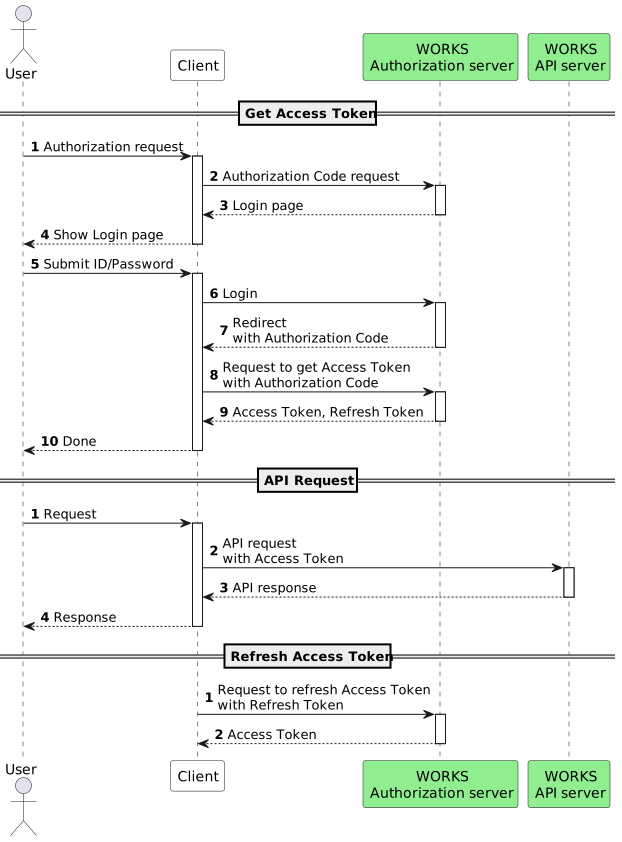
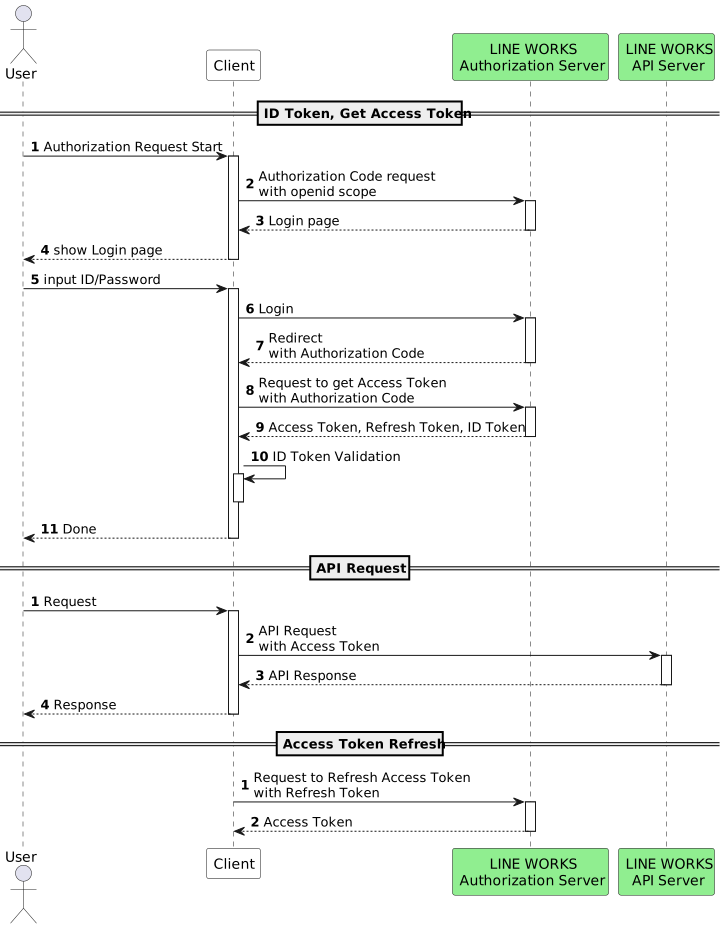
- Create an app in the Developer Console. Specify the required Scope and Redirect URL.
- Set response_type to code, and request user authentication by passing the client ID, redirect URL, and scope information.
- Verify the user's credentials; if the user is not logged in, display the login screen.
- The user logs in by entering the username and password on the login screen.
- After successful login, an authorization code is issued and redirected as a query parameter of the Redirect URL.
- Request an access token using the authorization code.
- Get an access token and ID token.
- If an access token expires, renew the access token with a refresh token.
When you get only an access token
When you get an access token and ID token
Implicit flow {#implicit-flow}
If response_type is id_token or token id_token in the authorization request, the implicit flow applies.
Note
- Using the authorization code flow is usually recommended.
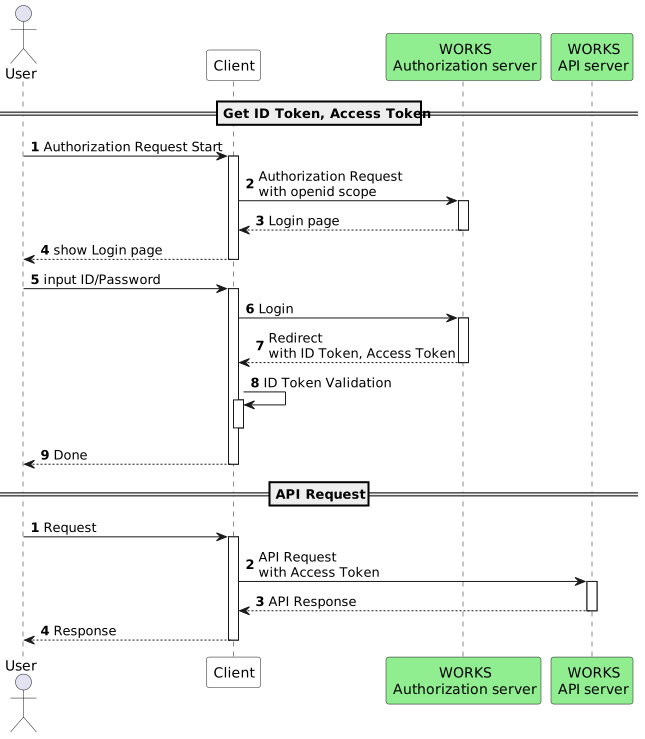
- Create an app in the Developer Console. Specify the required Scope and Redirect URL.
- Set response_type to id_token or token id_token, and request user authentication by passing the client ID, redirect URL, and scope information.
- Verify the user's credentials; if the user is not logged in, display the login screen.
- The user logs in by entering the username and password on the login screen.
- After successful login, an ID token and access token are issued and redirected to the Redirect URL.
- Verify and use the issued access token and ID token.
When you get an access token and ID token
Token type and specification {#expiry-and-count}
You can get the following tokens, each of which has a different validity period. Note that an authorization code has a limited number of uses.
| Type | Description | Validity period | Number of uses |
|---|---|---|---|
| Authorization code | An authorization code used in the authorization code flow | 10 minutes | Only once |
| Access token | Include user credentials and API scope | 1 hour or 24 hours | - |
| Refresh token | It is used to renew an access token without additional authentication when the existing access token expires. | 90 days | - |
| ID token | Include user credentials and additional information (email, name, locale, etc.) | 1 hour | - |
Prerequisites {#preparation}
Add your app to the Developer Console and verify the following information.
- Client ID
- Client secret
- Redirect URL
- OAuth scope
Authorization request {#authorization-request}
Request authorization with your app information.
Request URL {#authorization-request-url}
https://auth.worksmobile.com/oauth2/v2.0/authorize?client_id={Client_ID}&redirect_uri={Redirect_URL}&scope={Scope}&response_type={code|id_token|token%20id_token}&state={state}&nonce={nonce}HTTP method {#authorization-request-method}
GET
Request parameter {#authorization-request-parameter}
Each parameter value must be URL-encoded.
| Parameter | Type | Required | Description |
|---|---|---|---|
| client_id | String | Y | The app's client ID issued by the Developer Console |
| redirect_uri | String | Y | Customer's URL to pass the issued authorization code or ID token to. It must be URL-encoded and must match the redirect URL added for the client app. |
| scope | String | Y | API scopes. You can use a comma (,) or an empty space ( ) to add multiple scopes. For more information, see OAuth Scopes. When getting an ID token · You need to specify "openid". · Add "email" if the ID token should contain email information, or "profile" if it should contain name and locale information. |
| response_type | String | Y | OAuth 2.0 response type The value specifies which flow applies. · "code": Authorization code (authorization code flow) · "id_token": ID token (implicit flow) · "token id_token": Access token and ID token (implicit flow) |
| state | String | Y | A value to prevent Cross-Site Request Forgeries (CSRF) |
| nonce | String | - | A value to prevent replay attacks. · Required for the implicit flow. Specify a value that is difficult to guess. |
| domain | String | N | Domain name It is required if you use SSO. If not specified, users are not redirected to the customer login page. |
Request example {#authorization-request-example}
Authorization code flow {#authorization-request-example-authcode}
curl --location --request GET 'https://auth.worksmobile.com/oauth2/v2.0/authorize?client_id=X6xn4Bc9k_t2RstnAwrX&redirect_uri=https://example.com/redirect-url&scope=openid&response_type=code&state=UmyR2sX9gO&nonce=Gwbna3Srbl355n2c'Implicit flow {#authorization-request-example-implicit}
curl --location --request GET 'https://auth.worksmobile.com/oauth2/v2.0/authorize?client_id=X6xn4Bc9k_t2RstnAwrX&redirect_uri=https://example.com/redirect-url&scope=openid&response_type=id_token&state=UmyR2sX9gO&nonce=Gwbna3Srbl355n2c'Response {#authorization-redirect-parameter}
After successful login, users will be redirected to the specified redirect URL (redirect_uri). If login fails, an error is displayed.
Authorization code flow {#authorization-redirect-parameter-authcode}
| Property | Type | Required | Description |
|---|---|---|---|
| code | String | Y | Authorization code. It is a one-time code which is valid for 10 minutes. |
| state | String | Y | A value passed when an authorization code is requested |
Implicit flow {#authorization-redirect-parameter-implicit}
| Parameter | Type | Description |
|---|---|---|
| access_token | String | Access token. It is returned if response_type includes "token". It must be verified before being used. |
| id_token | String | ID token. It must be verified before being used. |
| scope | String | Scopes available with the access token |
| expires_in | String | Access token's validity period. It is based on the settings under Token settings > Access Token expiration date in the Developer Console. • 1 hour (3600 seconds) • 24 hours (86400 seconds) The token will automatically expire after the specified period of time. |
| token_type | String | Token type. "Bearer" |
| state | String | The value specified when authentication was requested |
Response example {#authorization-redirect-example}
Authorization code flow {#authorization-redirect-example-authcode}
GET https://example.com/redirect-url?code=GgWvoas...&state=aBcDeFImplicit flow {#authorization-redirect-example-implicit}
GET https://example.com/redirect-url#access_token=jp1AAAAwQ...&id_token=eyJ0eXAiOiJKV.&scope=openid&expires_in=86400&token_type=Bearer&state=UmyR2sX9gOGet a token {#issue-token}
Using a token, you can make API calls without additional authentication until the token expires.
Making an API call may require an additional request to verify the token information or to renew the token's validity period. Using an access token that expired causes an error.
※ For the authorization code flow, use the issued authorization code to get a token.
Request URL {#issue-access-token-request-url}
https://auth.worksmobile.com/oauth2/v2.0/tokenHTTP method {#issue-access-token-request-method}
POST
Request header {#issue-access-token-request-header}
Content-Type: application/x-www-form-urlencodedRequest form parameters {#issue-access-token-request-parameter}
Each parameter value must be URL-encoded.
| Parameter | Type | Required | Description |
|---|---|---|---|
| code | String | Y | Enter the issued authorization code. |
| grant_type | String | Y | Set this parameter to "authorization_code". |
| client_id | String | Y | The app's client ID issued by the Developer Console |
| client_secret | String | Y | The app's client secret issued by the Developer Console |
| redirect_uri | String | N | Customer's URL to pass the issued authorization code or ID token to. It must be URL-encoded and must match the redirect URL added for the client app. |
| domain | String | N | Domain name It is required if you use SSO. |
Request example {#issue-access-token-request-example}
curl --location --request POST 'https://auth.worksmobile.com/oauth2/v2.0/token' \--header 'Content-Type: application/x-www-form-urlencoded' \--data-urlencode 'code=GgWvoasicmC8MMaUzuxx' \--data-urlencode 'grant_type=authorization_code' \--data-urlencode 'client_id=ZbsOq6zjt0IhtZZnrc' \--data-urlencode 'client_secret=oRm3M_nBg6' \--data-urlencode 'redirect_uri=https://example.com/redirect-url'Response body (JSON) {#issue-access-token-response-body}
| Property | Type | Description |
|---|---|---|
| access_token | String | Access token. It is required to be included in the header to make an API call, and is valid for ONE day. |
| refresh_token | String | Refresh token |
| id_token | String | ID token It is issued only when scope is openid. For more information about an ID Token, see ID Token. |
| scope | String | OAuth scopes for the token. |
| expires_in | String | Access token's validity period. It is based on the settings under Token settings > Access Token expiration date in the Developer Console. • 1 hour (3600 seconds) • 24 hours (86400 seconds) The token will automatically expire after the specified period of time. |
| token_type | String | Token type. Bearer |
Response example {#issue-access-token-response-example}
{ "access_token": "jp1AAAAwQ...", "refresh_token": "AAAAUrG72...", "id_token": "eyJ0eXAiOiJKV...", "scope": "bot", "expires_in": "86400", "token_type": "Bearer"}Caution
- Store the validity period of the access token and the refresh token.
- Before using the API, verify the validity period of the access token; if it expired, use the refresh token to renew the access token.
- Verify and then use the issued access token and ID token.** For more information, see Verify an ID token.
Renew an access token {#refresh-access-token}
When an access token expires in the authorization code flow, you can renew it with a refresh token.
It depends on the settings under Token settings > Access Token Rotation in the Developer Console.
If Refresh Token Rotation is On
- When you renew an access token, a new access token and a new refresh token are issued.
- A maximum of 100 access tokens and 100 refresh tokens are valid; if the maximum number is exceeded, the oldest one expires.
- Tokens are counted based on the combination of client_id and user account (or service account).
If Refresh Token Rotation is Off
- When you renew an access token, only a new access token is issued and the previous one expires.
Request URL {#refresh-access-token-request-url}
https://auth.worksmobile.com/oauth2/v2.0/tokenHTTP method {#refresh-access-token-request-method}
POST
Request header {#refresh-access-token-request-header}
Content-Type: application/x-www-form-urlencoded
Request form parameters {#refresh-access-token-request-parameter}
Each parameter value must be URL-encoded.
| Parameter | Type | Required | Description |
|---|---|---|---|
| refresh_token | String | Y | The refresh_token value that was issued together with the access token. |
| grant_type | String | Y | Set this parameter to "refresh_token". |
| client_id | String | Y | The app's client ID issued by the Developer Console |
| client_secret | String | Y | The app's client secret issued by the Developer Console |
Request example {#refresh-access-token-request-example}
curl --location --request POST https://auth.worksmobile.com/oauth2/v2.0/token \--header 'Content-Type: application/x-www-form-urlencoded' \--data-urlencode 'refresh_token=AAAAUrG721oexirJYyMXOdFMhVpRIDLP9g8gIIGf5xklkE+5FTIITjwlUGCyfJ5F3u4fWi4bIBheJ/2xrQ40M9VTd//g4aEqH1vBwjS6kKpGnUUen2oJqyNcel2fOz8E3nFKAQ==' \--data-urlencode 'grant_type=refresh_token' \--data-urlencode 'client_id=ZbsOq6zjt0IhtZZnrc' \--data-urlencode 'client_secret=oRm3M_nBg6'Response body (JSON) {#refresh-access-token-response-body}
| Property | Type | Description |
|---|---|---|
| access_token | String | A new access token. It is required to be included in the header to make an API call. |
| refresh_token | String | A new refresh token. It is returned only when Refresh Token Rotation is On. |
| scope | String | OAuth scopes for the token. |
| expires_in | String | Access token's validity period. It is based on the settings under Token settings > Access Token expiration date in the Developer Console. • 1 hour (3600 seconds) • 24 hours (86400 seconds) The token will automatically expire after the specified period of time. |
| token_type | String | Token type. Bearer |
Response example {#refresh-access-token-response-example}
{ "access_token": "kr1AAAAwQSFbOgcXEy7kRGlljKS5/8UwpRh454bljHQajmS7TK069czqA0JcuCcbfDNWRqouQVL/cw64btBW08PQALp10jr3cqgQrA9sdytxKo0+xVT90b3yHs+/6/PM//qEjubrjyYMO+Nt3lPZrFOzzJiRiAQqU0lor0zWk+ZNxMm6D40nB8jD74voYpLTKX+HjSh63Xihmq1ckyN72OjkmmRuZ5+9Qp5GPvWp8jnL8n2ewFI/3D8hg9KFicOUh5V6aKqaxDj+zYuA9xAPOTgJMRpNZA=", "scope": "bot", "expires_in": "86400", "token_type": "Bearer"}Invalidate a token {#revoke-token}
You can force an access token or refresh token to expire.
Request URL {#revoke-token-request-url}
https://auth.worksmobile.com/oauth2/v2.0/revokeHTTP method {#revoke-token-request-method}
POST
Request header {#revoke-token-request-header}
Content-Type: application/x-www-form-urlencodedRequest parameters {#revoke-token-request-parameter}
| Name | Type | Required | Description |
|---|---|---|---|
| client_id | String | Y | The app's client ID issued by the Developer Console |
| client_secret | String | Y | The app's client secret issued by the Developer Console |
| token | String | Y | An access token or a refresh token to invalidate. If successful, the token expires. If the refresh token expires, the access token expires as well. |
| token_type_hint | String | N | Hint about the type of token to invalidate. Use access_token or refresh_token. Using refresh_token will cause all the access_tokens to expire. |
Request example {#revoke-token-request-example}
curl --location --request POST 'https://auth.worksmobile.com/oauth2/v2.0/revoke' \--header 'Content-Type: application/x-www-form-urlencoded' \--data-urlencode 'token=kr1AAAA0pZvx/7yyppqVGFfFf2X6HcfTcuNQ6ad1HEXjs3CBikVHSqqwWW218HCElz5JpN+13gothwKxdF98w6GGSzgWBkmarR96Bz3/oiFexXoVYswTntRLF6CYGLmW4VtZnrgeWRL1XmchdrNopKDc8sdfKL1AHhs+xVUCTW1Cc1ozhSFzXAu2VHLWf4R2osM+j/UoiombXGI3ywYjvfoUqTDdpOf8YRqqkI4BbiWMgJWAJe+i4HXFCOHbOI0zOUSrAfGBPadF+HAEyvUOBudoBQ2g/zalcQRnmKEj3uJWr9vsyHq' \--data-urlencode 'client_id=ZbsOq6zjt0IhtZZnrc' \--data-urlencode 'client_secret=nWgG8mdOiM' \--data-urlencode 'token_type_hint=refresh_token'Response {#revoke-token-response}
HTTP 200 OK
OIDC logout (RP Initiated Logout) {#oidc-logout}
You can ask LINE WORKS to log a user out.
Comply with OpenID Connect RP-Initiated Logout 1.0.
Request URL {#oidc-logout-request-url}
GET or POST https://auth.worksmobile.com/oauth2/v2.0/logoutRequest parameters {#oidc-logout-request-parameter}
| Property | Type | Required | Description |
|---|---|---|---|
| id_token_hint | String | Y | The ID token issued by the OIDC login. Pass the ID token of the user to be logged out. |
| client_id | String | Y | client_id of the app you want to log out of |
| post_logout_redirect_uri | String | Y | URL to redirect to after logout of the IDP (LINE WORKS) It must match the redirect URL specified in OIDC Logout Redirection in the Developer Console. |
| state | String | N | A value to prevent Cross-Site Request Forgeries (CSRF) Specify a value that is difficult to guess. It is included when redirected to post_logout_redirect_uri. |
Request example - GET {#oidc-logout-request-example-get}
curl --location --request GET 'https://auth.worksmobile.com/oauth2/v2.0/logout?id_token_hint=eyJ0e...&client_id=X6xn4...&post_logout_redirect_uri=https%3A%2F%2Fyourdomain.com%2Flogout%2Fcallback&state=UmyR2sX9gO'Request example - POST {#oidc-logout-request-example-post}
curl --location 'https://auth.worksmobile.com/oauth2/v2.0/logout' \--header 'Content-Type: application/x-www-form-urlencoded' \--data-urlencode 'id_token_hint=eyJ0e...' \--data-urlencode 'client_id=X6xn4Bc9k_t2RstnAwrX' \--data-urlencode 'post_logout_redirect_uri=https://yourdomain.com/logout/callback' \--data-urlencode 'state=UmyR2sX9gO'Response {#oidc-logout-response}
If the request is valid, check if the user is logged out. If the user is logged out of LINE WORKS, they are redirected to post_logout_redirect_uri.
Success
| Property | Type | Description |
|---|---|---|
| state | String | The value passed when logout was requested |
Use an access token {#how-to-use-access-token}
Include the access token in the Authorization HTTP request header along with the Bearer to make an API call.
Caution
- The authorization type must be Bearer. Please make sure to put an empty space between Bearer and the token.
PostMethod method=new PostMethod(url);method.setRequestHeader("Authorization","Bearer AAAA5IdUiCj5emZowcf49VRu7qbb548g6aGE");