LINE WORKS APIs
LINE WORKS APIs are used to integrate with LINE WORKS.
With the LINE WORKS APIs, you can develop an app that uses various LINE WORKS features and resources, such as using a bot, managing teams and groups, and uploading and downloading files.
How the LINE WORKS APIs work {#how-api-works}
The following flow shows how the LINE WORKS APIs work.
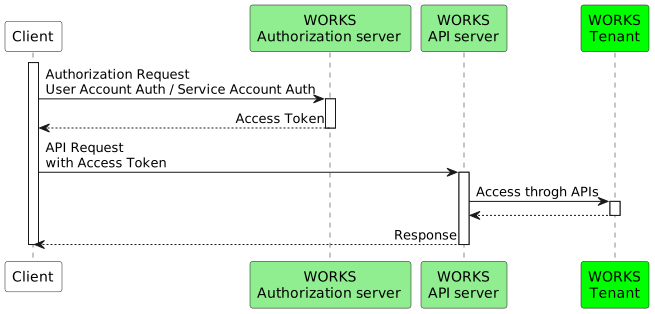
- Making an API call requires an access token. From the Developer Console, create an app and get an access token using the app information. For more information, see Authentication and authorization.
- Using the access token, send an API request to the API server. For common API information, see API Call.
API reference {#api-reference}
The API reference provides detailed description of each API operation, such as what it does and how to use it, which you must understand to use the LINE WORKS APIs.
API categories {#category}
The LINE WORKS APIs fall into several categories, as summarized in the following table.
| Category | Description |
|---|---|
| Bot | Makes a bot send messages, sets a bot menu, or manages bots. |
| Directory | Manages user and team related resources, such as members, teams, and groups. |
| Calendar | Gets, creates, and deletes events, and manages calendars. |
| Board | Manages boards, posts, and comments. |
| Note | Manages team/group notes. |
| Contact | Manages contacts and contact tags. |
| Drive | Manages my drive, collaborative drives, and team/group folders. |
| Manages mail settings, such as sending, reading and deleting email messages, or folders and filters. | |
| Task | Manages tasks and task categories. |
| Audit | Manages audit data. |
| Monitoring | Manages monitoring data. |
| Security | Sets whether to use external browsers. |
Glossary {#glossary}
The API reference includes the following glossaries to represent API schemas.
- type: Data type
- string: String
- number: Number
- integer: Integer
- boolean: True or false
- array: Array
- object: Object
- String
- maxLength: Maximum length
- minLength: Minimum length
- Number
- maximum: Maximum value
- minimum: Minimum value
- Array
- maxItems: Maximum element
- minItems: Minimum element
- Others
- default: Default value
- required: Required value
- enum: Predefined constant value
- example: Example
- pattern: Pattern in which a value is represented
- format: Value format
- writeOnly: Write only
- readOnly: Read only