スパン
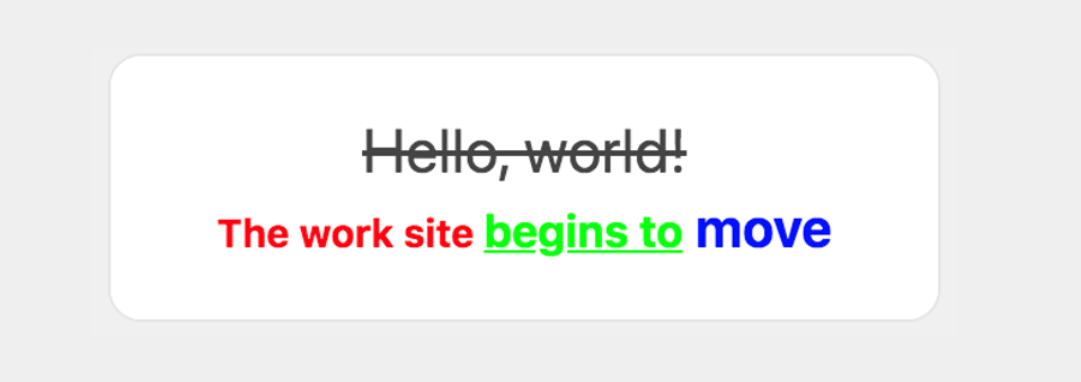
1行に、互いに異なるデザインの文字列を複数表示するコンポーネントです。
文字の色、サイズ、太さ、装飾を指定できます。スパンは、テキスト の contents プロパティに設定します。
スパンは テキスト コンポーネントと同様に多言語に対応しており、クライアントのデバイスの設定言語に合わせて表示を切り替えることができます。
Request Content {#span-request-parameter}
| パラメータ | タイプ | 説明 |
|---|---|---|
| type | string | "span" required |
| text | string | 表示されるテキスト 親テキストの wrap プロパティを true に設定した場合には、改行文字 ("\n") を使って改行できます。 required |
| color | string | 文字の色 16 進数カラーコードで設定します。 |
| size | string | 文字サイズ xxs、xs、sm、md、lg、xl、xxl、3xl、4xl、5xl のいずれかの値を指定できます。 列挙した順に文字のサイズが大きくなります。 デフォルト値は md です。 |
| weight | string | 文字の太さ regular 、 bold のいずれかの値を指定できます。 bold を指定すると太字になります。 デフォルト値は regular です。 |
| style | string | テキストのスタイル 以下のいずれかの値を指定します。 • normal : 標準 • italic : 斜体 デフォルト値は normal です。 |
| decoration | string | テキストの装飾 以下のいずれかの値を指定します。 • none : 装飾なし • underline : 下線 • line-through : 取り消し線 デフォルト値は none です。 |
※ テキストの decoration プロパティで設定した装飾は、スパンの decoration プロパティで上書きできません。
Request Example {#span-request-example}
{ "type": "bubble", "body": { "type": "box", "layout": "horizontal", "contents": [ { "type": "text", "contents": [ { "type": "span", "text": "Hello, world!", "decoration": "line-through", "size": "xl" }, { "type": "span", "text": "\nThe work site ", "color": "#ff0000", "size": "sm", "weight": "bold" }, { "type": "span", "text": "begins to", "size": "md", "color": "#00ff00", "decoration": "underline", "weight": "bold" }, { "type": "span", "text": " move", "color": "#0000ff", "weight": "bold", "size": "lg" } ], "align": "center", "wrap": true } ] }}