バブル
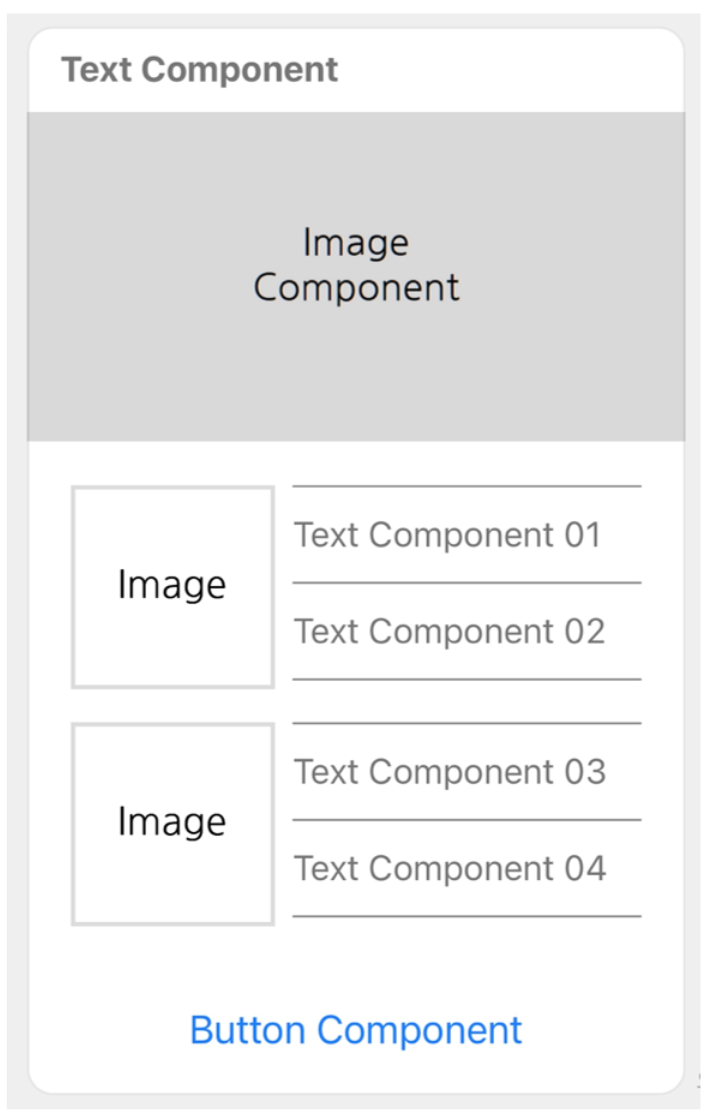
バブルは、1 つのメッセージバブルで構成されたコンテナです。ヘッダー、ヒーロー、ボディ、フッター という 4 つのブロックを含めることができます。各ブロックの用途について詳しくは、要素 > ブロック を参照してください。
バブルを定義する JSON データの最大サイズは 15KB です。
Request Content {#bubble-request-parameter}
| パラメータ | タイプ | 説明 |
|---|---|---|
| type | string | "bubble" required |
| size | string | バブルのサイズ nano、micro、kilo、mega、giga のいずれかの値を指定できます。 デフォルト値は mega です。 |
| direction | string | テキストの方向および水平ボックスでコンポーネントを配置する方向 以下のいずれかの値を指定します。 • ltr: テキスト・コンポーネントを左から右に表記・配置 • rtl: テキスト・コンポーネントを右から左に表記・配置 デフォルト値は ltr です。 |
| header | object | ヘッダーのブロック ボックス を指定します。 |
| hero | object | ヒーローのブロック ボックス または 画像 を指定します。 |
| body | object | ボディのブロック ボックス を指定します。 |
| footer | object | フッターのブロック ボックス を指定します。 |
| styles | object | ブロックのスタイル バブルスタイル を指定します。 |
| action | object | 画像をタップした時に実行されるアクション Action Object を指定します。 |
ブロックのスタイルを定義するオブジェクト {#bubble-style-object}
バブル内のブロックのスタイルは以下の 2 つのオブジェクトを使って定義します。
バブルスタイル {#bubble-style}
| パラメータ | タイプ | 説明 |
|---|---|---|
| header | object | ヘッダーのスタイル ブロックスタイル を指定します。 |
| hero | object | ヒーローのスタイル ブロックスタイル を指定します。 |
| body | object | ボディのスタイル ブロックスタイル を指定します。 |
| footer | object | フッターのスタイル ブロックスタイル を指定します。 |
ブロックスタイル {#block-style}
| パラメータ | タイプ | 説明 |
|---|---|---|
| backgroundColor | string | ブロックの背景色 16 進数カラーコードで設定します。 |
| separator | boolean | ブロック上にセパレータを配置するには true を指定します。 デフォルト値は false です。 |
| separatorColor | string | セパレータのカラー 16 進数カラーコードで設定します。 |
参考
- セパレータは、先頭のブロックの上には配置できません。
Request Example {#bubble-request-example}
{ "type": "bubble", "header": { "type": "box", "layout": "vertical", "contents": [ { "type": "text", "text": "Text Component", "weight": "bold" } ], "paddingAll": "10px", "paddingStart": "15px" }, "hero": { "type": "image", "url": "https://developers.worksmobile.com/image/en/bot/message_type/Image-Component.png", "size": "full", "aspectMode": "cover", "aspectRatio": "2:1" }, "body": { "type": "box", "layout": "vertical", "contents": [ { "type": "box", "layout": "horizontal", "contents": [ { "type": "box", "layout": "vertical", "contents": [ { "type": "image", "url": "https://developers.worksmobile.com/image/en/bot/message_type/Image.png", "size": "lg" } ], "borderWidth": "2px", "borderColor": "#90909050", "width": "93px", "height": "93px" }, { "type": "box", "layout": "vertical", "contents": [ { "type": "separator", "color": "#909090" }, { "type": "text", "text": "Text Component 01" }, { "type": "separator", "color": "#909090" }, { "type": "text", "text": "Text Component 02" }, { "type": "separator", "color": "#909090" } ], "height": "100px", "margin": "md", "spacing": "lg" } ] }, { "type": "box", "layout": "horizontal", "contents": [ { "type": "box", "layout": "vertical", "contents": [ { "type": "image", "url": "https://developers.worksmobile.com/image/en/bot/message_type/Image.png", "size": "lg" } ], "borderWidth": "2px", "borderColor": "#90909050", "width": "93px", "height": "93px" }, { "type": "box", "layout": "vertical", "contents": [ { "type": "separator", "color": "#909090" }, { "type": "text", "text": "Text Component 03" }, { "type": "separator", "color": "#909090" }, { "type": "text", "text": "Text Component 04" }, { "type": "separator", "color": "#909090" } ], "height": "100px", "margin": "md", "spacing": "lg" } ], "margin": "md" } ] }, "footer": { "type": "box", "layout": "vertical", "contents": [ { "type": "button", "action": { "type": "uri", "label": "Button Component", "uri": "https://works.do/" }, "height": "sm", "style": "link" } ] }}