Upload or Download Files
This page describes how to upload or download files including bot content, drive files, photo files of member profiles or contacts, to or from the server.
Upload files {#file-upload}
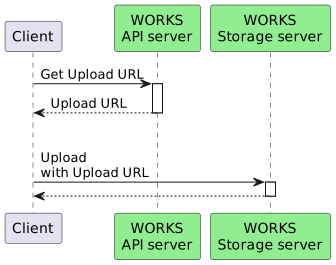
How to upload a file is as follows:
1. Request a file upload URL {#get-upload-url}
Request a URL to upload a file from each service.
Request URL {#get-upload-url-api}
The request URL to get a file upload URL depends on each service. For more information, see the following:
Request body {#get-upload-url-request-body}
Call the POST method with the following properties specified in JSON format.
| Property | Type | Required | Description |
|---|---|---|---|
| fileName | String | Required | File name |
| fileSize | Long | Required | File size (in bytes) |
File resource {#get-upload-url-request-resource}
| Property | Type | Required | Description |
|---|---|---|---|
| fileName | String | Required | File name |
| fileSize | Long | Required | File size (in bytes) |
| modifiedTime | String | Optional | File update date and time |
| overwrite | boolean | Optional | Indicates whether to overwrite a file. |
Request body example
{ "fileName": "fileName", "fileSize": 1000000}Response {#get-upload-url-response}
A file upload URL is returned as a response. For more information, see the API reference.
| Property | Type | Description |
|---|---|---|
| uploadUrl | String | URL to upload a file |
Response example {#get-upload-url-response-example}
{ "uploadUrl": "https://apis-storage.worksmobile.com/k/emsg/r/kr1/1628695775389602000.1628782175.1.1000001.0.0.0/file.jpg"}2. Upload files {#file-content-upload}
Upload a file to the server, by using the returned URL. If the upload is resumable, you need to pass the offset value in the Content-Range header.
Request URL {#file-content-upload-request-url}
The upload URL returned as a response.
HTTP method {#file-content-upload-request-method}
POST (Content-Type: multipart/form-data; boundary="$boundary")
Request example {#file-content-upload-request-example}
POST /k/emsg/r/kr1/1628695775389602000.1628782175.1.1000001.0.0.0/file.jpg HTTP/1.1Host: apis-storage.worksmobile.comAuthorization: Bearer ...Content-Length: 1000Content-Type: multipart/form-data; boundary=----WebKitFormBoundary7MA4YWxkTrZu0gW----WebKitFormBoundary7MA4YWxkTrZu0gWContent-Disposition: form-data; name="Filedata"; filename="xxx.jpg"Content-Type: image/jpeg(data)----WebKitFormBoundary7MA4YWxkTrZu0gW--Request example (resume upload) {#file-content-resume-upload-request-example}
POST /k/emsg/r/kr1/1628695775389602000.1628782175.1.1000001.0.0.0/file.jpg HTTP/1.1Host: apis-storage.worksmobile.comAuthorization: Bearer ...Content-Length: 1000Content-Type: multipart/form-data; boundary=----WebKitFormBoundary7MA4YWxkTrZu0gWContent-Range: 100-999/1000----WebKitFormBoundary7MA4YWxkTrZu0gWContent-Disposition: form-data; name="Filedata"; filename="xxx.jpg"Content-Type: image/jpeg(data)----WebKitFormBoundary7MA4YWxkTrZu0gW--Request example (CURL) {#file-content-upload-request-example-curl}
curl -XPOST 'https://apis-storage.worksmobile.com/k/emsg/r/kr1/1628695775389602000.1628782175.1.1000001.0.0.0/file.jpg' \-H 'Authorization: Bearer ...' \-H 'Content-Type: multipart/form-data' \-F 'resourceName=file.jpg' \-F 'FileData=@file.jpgHTTP/1.1 201 CreatedContent-Type: application/json;charset=UTF-8Content-Length: 120{ "fileId": "kr1.1628695315008671000.1628781715.0.1000001.0.0.0", "fileName": "file.jpg", "fileSize": "11"}Response {#file-content-upload-response-body}
The response for uploading a file. It may differ depending on resources.
| Property | Type | Description |
|---|---|---|
| fileId | String | File ID |
| fileName | String | File name |
| fileSize | Integer | File size |
File resource {#file-content-upload-response-body-drive}
| Property | Type | Description |
|---|---|---|
| fileId | String | File ID |
| fileName | String | File name |
| fileSize | Integer | File size |
| parentFileId | String | File ID of the parent folder |
| accessedTime | String | Access date and time |
| createdTime | String | Creation date and time |
| filePath | String | File path |
| fileType | String | File type |
| hasPermission | Boolean | Indicates whether access permission for the file is set. |
| permissionRootFileId | String | Permission root folder ID |
| resourceLocation | Integer | Resource location code |
| statuses | Array(String) | File status |
| modifiedTime | String | Update date and time |
Download files {#file-download}
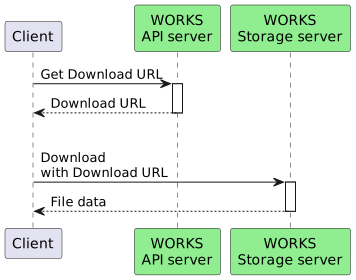
How to download a file is as follows.
1. Get a file download URL {#get-download-url}
Request URL {#get-download-url-api}
Here are download API operations for each service.
HTTP method {#get-download-url-request-method}
GET
Path parameter {#get-download-url-request-parameter}
| Property | Type | Required | Description |
|---|---|---|---|
| fileId | String | Required | File ID |
Response {#get-download-url-response}
The response code includes the download URL in the Location header, together with the HTTP status code 302.
Response example {#get-download-url-example}
HTTP/1.1 302 Found location: https://apis-storage.worksmobile.com/kr1.1628695315008671000.1628781715.0.1000001.0.0.02. Call the file download URL {#download-file-content}
Start downloading the file by using the URL specified in the Location header.
Request example (CURL) {#file-content-download-request-example-curl}
curl -XGET 'https://apis-storage.worksmobile.com/kr1.1628695315008671000.1628781715.0.1000001.0.0.0' \-H 'Authorization: Bearer ...' HTTP/1.1 200 OKContent-Type: image/jpegContent-Length: 11(FileData)