Web Login Page
Create a login page for the step 3 of "Figure SAML 2.0 based SSO between LINE WORKS and the customer." This page is where users enter their IDs and passwords to log in to the LINE WORKS web services including Mail, Calendar, Contact, and Drive.
Create a login page to fit the customer's needs.
After verifying the SAML request and processing the login request, generate a SAML response and return it to the ACS URL.
Request URL {#weblogin-request-url}
https://CustomerDomain/CustomerLoginPage
You can only use port 80 or 443 according to LINE WORKS's infrastructure security policy.
Register the request URL in Web Login URL under SSO > WORKS as SP in the Developer Console.
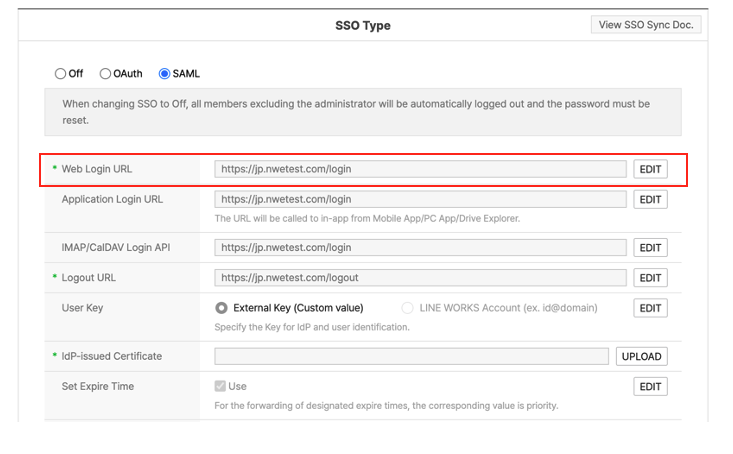
Figure Add SAML 2.0 based Web Login URL
HTTP method {#weblogin-request-method}
GET
Request {#weblogin-request-parameter}
| Parameter | Type | Required | Description |
|---|---|---|---|
| SAMLRequest | String | Y | A character string as specified in the SAML 2.0 request specification (encoded with Deflate + Base64) |
| RelayState | String | Y | URL to redirect to when authentication fails. |
| worksId | String | N | User's LINE WORKS account. It can be used on the customer's login page if needed. |
Note
- The customer must redirect a SAML response to the ACS URL of the LINE WORKS authentication system within 30 minutes after receiving a SAML request. Otherwise, the login is considered abnormal and thus fails.