IMAP/CalDAV Login API
Implement the logic that is associated with the steps 3 and 4 in "Figure SAML 2.0 based API authentication" and provide it as an API to LINE WORKS. LINE WORKS will use this API to let users log in to LINE WORKS using IMAP/CalDAV.
The customer SSO system should generate a SAML response and return it to the ACS URL after verifying the SAML request and authenticating the user with the Base64-encoded ID and password.
Caution
- If the customer SSO system has a feature such as account lockout, the API needs to handle the exception where user accounts become accidentally locked out during IMAP/CalDAV login.
Request URL {#auth-request-url}
https://CustomerDomain/APILogin
The URL must be secured with SSL (https) to handle passwords.
Register the request URL in IMAP/CalDAV Login API under SSO > WORKS as SP in the Developer Console.
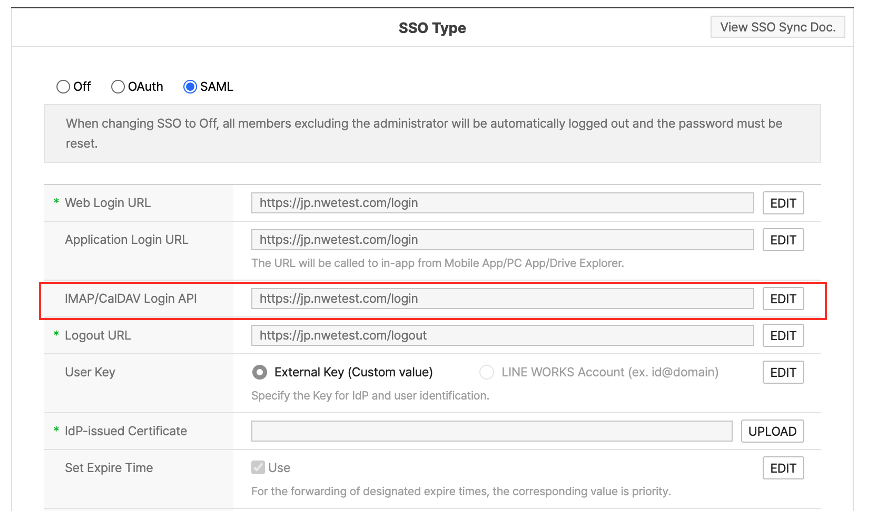
Figure Add SAML 2.0 based IMAP/CalDAV Login API
HTTP method {#auth-request-method}
POST
Request {#auth-request-parameter}
| Parameter | Type | Required | Description |
|---|---|---|---|
| String | Y | Email address (LINE WORKS ID) (encoded with Base64) | |
| password | String | Y | Password (encoded with Base64) |
| SAMLRequest | String | Y | A character string as specified in the SAML 2.0 request specification (encoded with Base64) |
| RelayState | String | Y | URL to redirect the user to when the authentication fails. It is not used for mobile apps. |
Response {#auth-response-parameter}
Return the following data in JSON, using HTTP POST.
| Property | Type | Required | Description |
|---|---|---|---|
| SAMLResponse | String | Y | A character string as specified in the SAML 2.0 response specification (encoded with Base64) |
| RelayState | String | Y | URL to redirect the user to when the authentication fails. It is not used for mobile apps. |