OAuth 2.0 Based SSO
This page describes how OAuth 2.0 based SSO works and how to implement it.
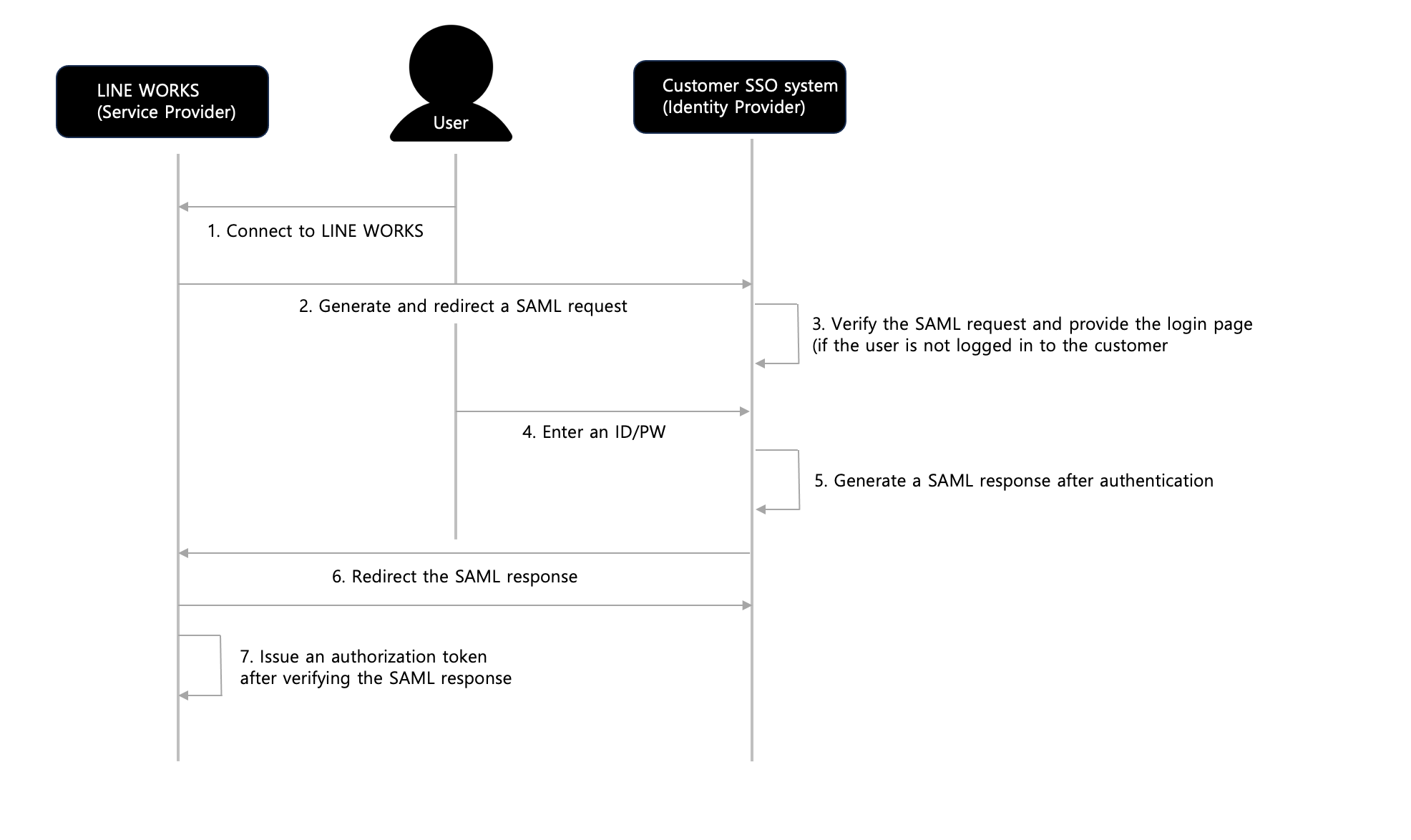
Figure OAuth 2.0 based SSO between LINE WORKS and the customer
Connect to LINE WORKS
The user opens the LINE WORKS web page in the web browser or run the LINE WORKS app or Drive Explorer to use the LINE WORKS services.Request an authorization code
If the user is not logged in to LINE WORKS, LINE WORKS requests an authorization code from the customer SSO system.Provide the login page (if the user is not logged in to the customer)
If the user is not logged in to the customer system, the customer provides its own login page to the user.Enter an ID/PW
The user enters the ID and password to log in to the system.Issue an authorization code after authentication
After authenticating the user with the ID and password, the customer issues an authorization code.
If the user is already logged in to the customer system, the customer issues an authorization code without going through the steps 3 and 4.
The authorization code must be a one-time code that expires after being used to return an access token.Return the authorization code (redirect)
The customer system redirects the authorization code to the LINE WORKS authentication system's redirect_uri, which is included in the request where an authorization code was requested first.Request an access token using the authorization code
LINE WORKS requests an access token from the customer SSO system, using the authorization code as a parameter.Return an access token
After verifying the authorization code, the customer SSO system issues an access token and returns it.Request user information using the access token
LINE WORKS requests user information from the customer SSO system, using the access token as a parameter.Return user information
After verifying the access token, the customer SSO system returns the user's externalKey.Get a LINE WORKS authorization token
Based on the user information, the LINE WORKS authentication system issues an authorization token for LINE WORKS.
OAuth 2.0 based API authentication {#api-auth}
IMAP/CalDAV authentication of LINE WORKS is partially based on OAuth 2.0.
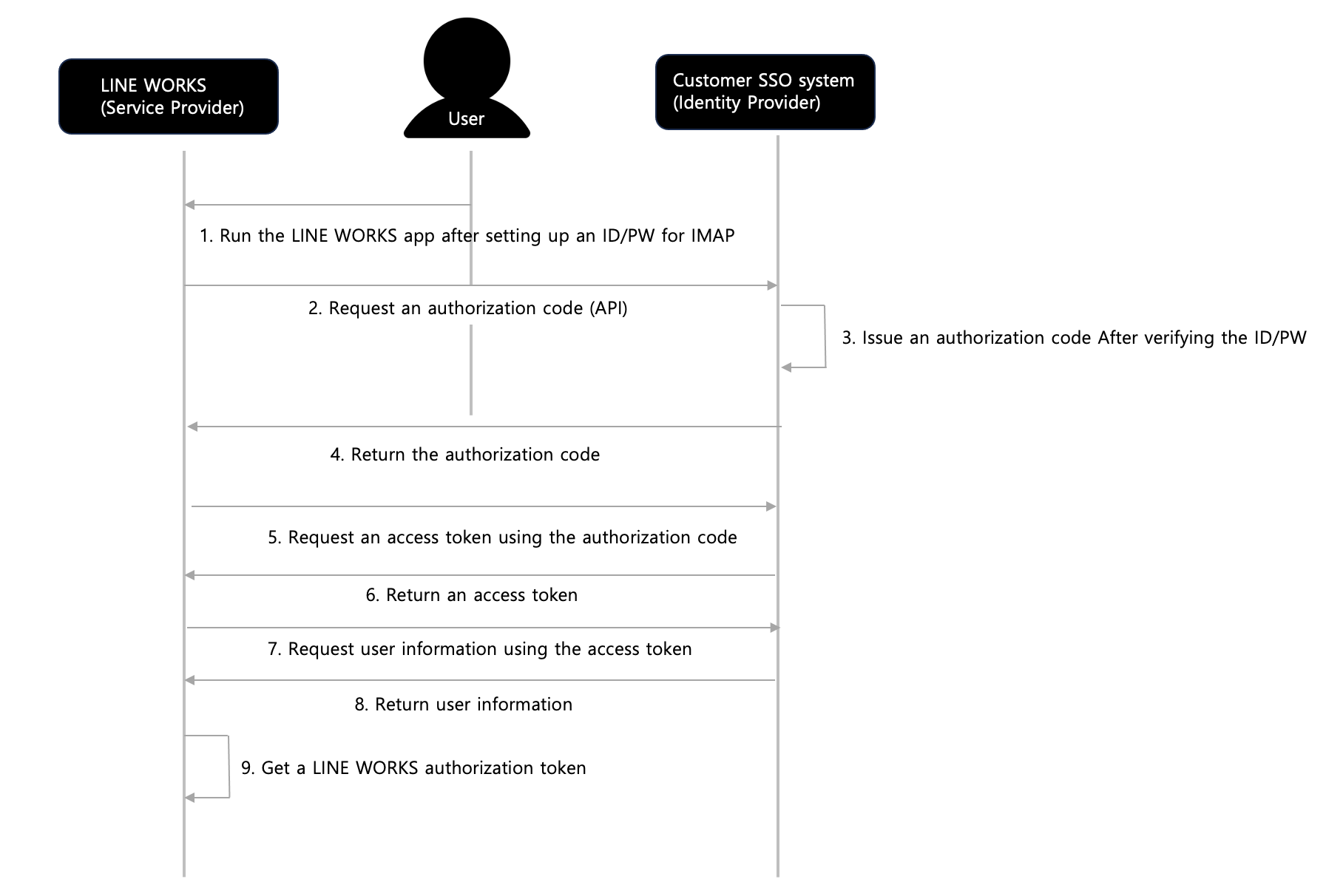
Run the LINE WORKS app after setting up an ID/PW for IMAP
The user runs the LINE WORKS app after setting up an ID and password for LINE WORKS, using Outlook, native apps, etc.Request an authorization code (API)
Passing the user's ID and password to the customer SSO system, LINE WORKS requests an authorization code from it. All network connections must be secured with SSL.Issue an authorization code After verifying the ID/PW
After authenticating the user with the ID and password, the customer SSO system issues an authorization code if the authentication is successful. It returns an error code if the authentication fails.Return the authorization code
As a response to the API request in the step 2, the customer SSO system returns the authorization code. It returns an error code if the authentication fails.Request an access token using the authorization code
LINE WORKS requests an access token from the customer SSO system, using the authorization code as a parameter.Return an access token
After verifying the authorization code, the customer SSO system issues an access token and returns it.Request user information using the access token
LINE WORKS requests user information from the customer SSO system, using the access token as a parameter.Return user information
After verifying the access token, the customer SSO system returns the user's externalKey.Get a LINE WORKS authorization token
Based on the user information, the LINE WORKS authentication system issues an authorization token for LINE WORKS.