Quick Reply
When a user receives a message with quick reply buttons included, the buttons are displayed at the bottom of the message room.
The user can reply by pressing one of the buttons.
You can add up to 13 quick reply buttons to any message types.
The following actions are available in a quick reply.
- Postback action
- Message action
- URI action
- Camera action (for iOS and Android only)
- Camera roll action (for iOS and Android only)
- Location action (for iOS and Android only)
You can set an icon for a quick reply button.
- If an icon is not set for the "camera," "cameraRoll," and "location" buttons, the default icon is displayed.
- For the "postback," "message," and "uri" buttons, an icon can be omitted.
Note
- Icons are displayed on the client software v2.6 or later.
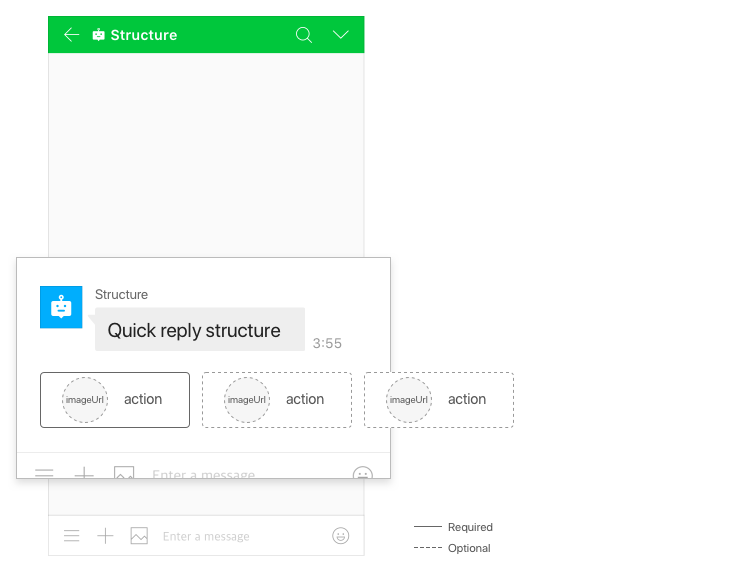
Figure Quick reply structure
Request content {#quickreply-request}
common {#quickreply-request-common}
| Parameter | Type | Required | Description |
|---|---|---|---|
| quickReply | object | N | Quick reply object |
| quickReply.items | array | Y | Quick reply button object Up to 13 objects |
| quickReply.items[].imageUrl | string | N | URL of the icon to be displayed to the left of the button (PNG format, HTTPS only). Either imageUrl or imageResourceId, but not both, can be specified. For the camera, camera roll, or location buttons, the default icon is displayed if not specified. Maximum size: 1 MB Maximum length: 1,000 characters |
| quickReply.items[].action | Action Object | Y | Action that occurs when the button is pressed |
resourceId, multi language {#quickreply-request-resourceid-multilang}
| Parameter | Type | Required | Description |
|---|---|---|---|
| quickReply.items[].i18nImageUrl | array | N | List of multilingual image URLs |
| quickReply.items[].i18nImageUrl[].language | string | Y | Language code • ko_KR • ja_JP • zh_CN • zh_TW • en_US |
| quickReply.items[].i18nImageUrl[].thumbnailImageUrl | string | Y | Image URL (PNG format, HTTPS only) Maximum size: 1 MB Maximum length: 1,000 characters |
| quickReply.items[].imageResourceId | string | N | Image resource ID Either imageUrl or imageResourceId, but not both, can be specified. Maximum size: 1 MB |
| quickReply.items[].i18nImageResourceIds[] | array | N | List of resource IDs for multilingual images |
| quickReply.items[].i18nImageResourceIds[].language | string | Y | Language code • ko_KR • ja_JP • zh_CN • zh_TW • en_US |
| quickReply.items[].i18nImageResourceIds[].imageResourceId | string | Y | Image resource ID Maximum size: 1 MB |
Request example {#quickreply-request-example}
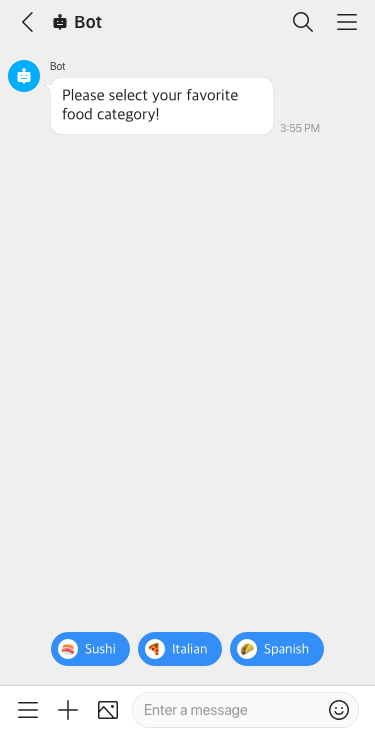
Quick reply structure {#quickreply-structure}
"quickReply": { "items": [ { "imageUrl": "https://www.example.com/a.png", "action": { "type": "message", "label": "Send message", "text": "send message" } }, { "action": { "type": "camera", "label": "Open camera" } } ]}Caution
Note that the quickReply property cannot be used alone it must be included in the message to send, as shown in the following example.
Text with quick reply {#quickreply-request-example-text}
{ "content": { "type": "text", "text": "Please select your favorite food category!", "quickReply": { "items": [ { "imageUrl": "https://www.example.com/a.png", "action": { "type": "message", "label": "sushi", "text": "Sushi" } }, { "imageUrl": "https://www.example.com/b.png", "action": { "type": "message", "label": "Italian", "text": "Italian" } }, { "action": { "type": "camera", "label": "Open Camera" } } ] } }}Flexible template with quick reply {#quickreply-request-example-flex}
{ "content": { "type": "flex", "altText": "This is a flexible template with quick reply", "contents": { "type": "bubble", "size": "mega", "hero": { "type": "box", "layout": "vertical", "contents": [ { "type": "text", "text": "YOU ARE INVITED!", "size": "xl", "color": "#ffffff", "weight": "bold", "align": "center", "wrap": true } ], "backgroundColor": "#81DBA0", "paddingAll": "15px" } }, "quickReply": { "items": [ { "imageUrl": "https://www.example.com/a.png", "action": { "type": "message", "label": "Accept", "text": "Accept" } }, { "imageUrl": "https://www.example.com/b.png", "action": { "type": "message", "label": "Decline", "text": "Decline" } } ] } }